Export a shot or edit as a movie
Render a selected shot or editorial timeline to MP4. Choose whether to mix its audio or export picture only.
Hear the cue inside the silence. Does the exported sound start and stop where you placed it?
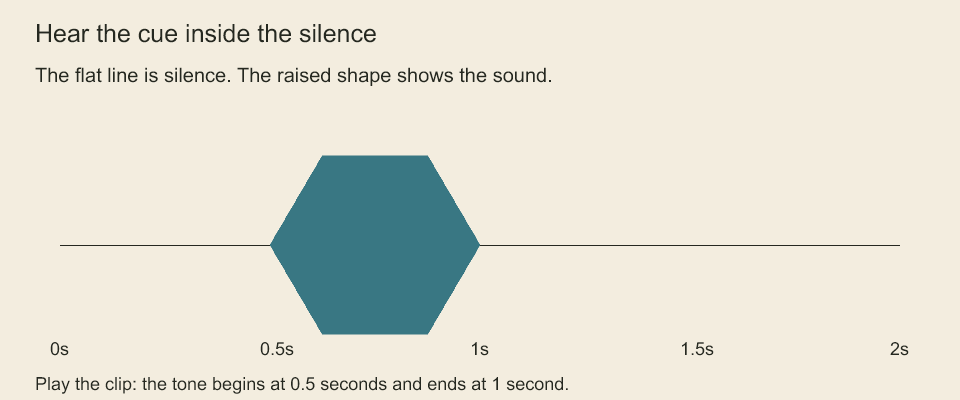
Play the two-second clip. Listen for the tone between 0.5 and 1 second, and compare that interval with the waveform. The waveform comes from decoded mixed audio. The clip contains a generated tone, not speech.
Keep the title you intended. What changes when the requested font is missing?
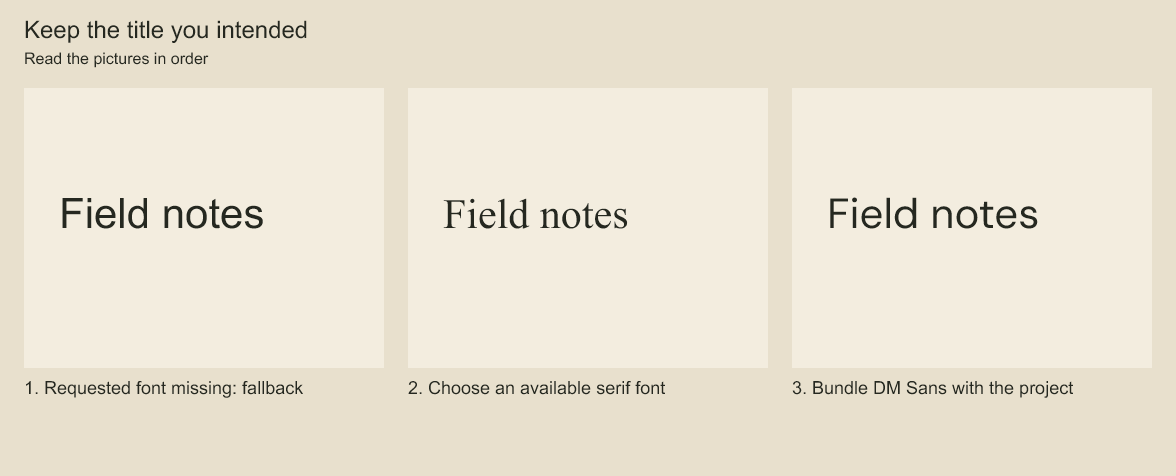
All samples say 'Field notes'. Compare letter shapes and spacing in the fallback, the chosen serif and the bundled font. A fallback can keep text visible while changing its appearance. Checking or bundling a font makes the choice explicit.
Shot and editorial movies
exportShotMovie(animation, output, options) and exportEditorialMovie(sequence, animations, output, options) export H.264 MP4 from isolated studio snapshots. They use the same FFmpeg process and temporary-output pipeline as board movies. Options include ffmpegPath, maxFrames (default 100000), signal and onProgress. Studio audio uses an explicit mix/omission policy; board tracks are not attached to a different timeline.
Set fontPolicy: 'require-available' on exportMovie, exportShotMovie or exportEditorialMovie to reject unavailable text families before audio extraction/decoding and picture rendering. Board export checks board panels; shot export checks that shot; editorial export checks its referenced shots, including hidden text. Failure creates no destination movie. The default allow-fallback retains backend font substitution. This is the same bounded availability check used by frame jobs, with the same generic-family and glyph/binary-identity limits. exportFrameJobMovie also accepts this optional policy to check source text, although its PNGs are already rendered; availability checking is not required merely to encode stored PNGs.
Pass range: {startFrame: 48, endFrame: 96} to export the half-open interval [48, 96) in the selected shot/editorial frame rate. Bounds must be nonnegative safe integers, nonempty and within that timeline. maxFrames applies to the selected frame count, and progress starts at zero for that output. Results include the original range. Frame evaluation keeps the original source positions, including active transitions and preroll keys; no source keys or clip ranges are rewritten.
Mixed audio uses the same window, with both absolute endpoints rounded to the nearest 48 kHz sample. At fractional frame rates this can differ by one sample from separately rounding the selected duration; the result reports the exact sample range. Authored fades and transition ramps retain their original phase. Clips outside the window are not decoded; intersecting clips are still decoded in full and remain subject to maxSamples. Dimensions and editorial validity are checked for all used sources, even for a partial export. Frame ranges are not persisted jobs, resumable checkpoints or a guarantee that separately encoded AAC chunks concatenate seamlessly.
CLI equivalent: codeboard movie film.cboard --editorial edit:main --start-frame 48 --end-frame 96 --omit-audio --output excerpt.mp4. Supply both bounds; these flags require --shot or --editorial. Use --mix-audio linear to include studio audio.
await exportEditorialMovie(
  project.editorialSequence('edit:main'),
  project.studio.animations,
  'editorial-picture.mp4',
  { maxFrames: 10000, audio: 'omit' },
);
CLI equivalents are codeboard movie film.cboard --output shot.mp4 --shot animation:greeting and codeboard movie film.cboard --output picture.mp4 --editorial edit:main. The selectors are mutually exclusive; omit both for the existing board movie with its board audio.
Studio movie sources must share even canvas dimensions, including sources separated by cuts. The image input uses an explicit rational frame rate, and the encoder receives the exact requested video frame count. A fractional frame rate is not rounded to an integer. Progress reports frames handed to the encoder, not completed playback validation. The output is published after FFmpeg closes successfully. Cancellation/failure terminates the child and removes its generated temporary file; cleanup errors are reported. A successful export still needs codec/frame-count/playback inspection before production delivery. This is not a persisted or resumable render job.
If a studio target has unmuted audio clips, picture-only movie export now requires { audio: 'omit' } (CLI --omit-audio). Alternatively select the mix policy below; without either policy it rejects. Editorial export checks both its own tracks and referenced animations.
Mix studio audio into MP4
const decoder = createFFmpegAudioDecoder(project.captureAssetReader());
const movie = await exportEditorialMovie(
  project.editorialSequence('edit:main'), project.studio.animations,
  'film.mp4', {
    audio: { mode: 'mix', decoder, transitions: 'linear' },
  },
);
The same policy works with exportShotMovie; its transition choice has no effect without editorial overlaps. The decoder can be the built-in FFmpeg adapter or another implementation of StudioAudioDecoder. maxSamples inside the audio policy may lower the mixer's 16777216-sample-per-channel ceiling (about 349 seconds at the fixed 48 kHz movie mix rate). The mix uses source-shot and sequence tracks, trims/conforms them, and writes stereo float PCM to a private temporary directory before AAC encoding at 192 kbit/s. It does not quantize through PCM16. Decoder FFmpeg/ffprobe paths are configured on the decoder; movie encoder ffmpegPath is independent.
Any sample above full scale rejects before video encoding. Adjust authored gains and review the mix; there is no automatic limiter or normalization. Results include audio.mode (mixed or omitted), and mixed results report sample rate/count, peak and clipping count. A silent authored mix still creates a silent audio stream. Codec delay, AAC true peak and A/V playback synchronization require delivery verification; zero PCM clipping does not prove codec output cannot overshoot.
CLI: codeboard movie film.cboard --output film.mp4 --editorial edit:main --mix-audio linear. Choose sum to retain overlapping audio gains, or --omit-audio for picture only. These policies are mutually exclusive. --ffprobe <path> is available with mixing; --ffmpeg configures both CLI decoding and encoding. Temporary audio files are removed on success/failure; a cleanup failure is reported even if the movie was already published. There is no resumable render queue or retained mix master.
Animatic packages accept maxFrames (default 100000); CLI: codeboard animatic film.cboard --output animatic --max-frames 2400. The limit must be a positive safe integer. The document, frame count and raw-document audio-root requirement are checked before output directories are created. Empty frame sequences remain allowed; movie containers require at least one frame. The options object is captured before asynchronous work, so later caller changes do not switch asset roots during export. The output directory must be new (even an existing empty directory is rejected). Parent directories are created as needed. Results use absolute paths. Ordinary media, encoding, cancellation or filesystem failures remove only the directory created for this export; cleanup failure is reported together with the original failure. Existing output directories are never cleaned or replaced.
exportAnimaticPackage also accepts signal: AbortSignal. Cancellation is checked before work, between assets/frames and before manifest publication. Each frame canvas is released after encoding. The exporter writes a temporary manifest and renames it to animatic.json only after completing all assets and PNGs; consumers should require this manifest before accepting a package. Abrupt process death can leave a directory without that completion marker. Retry into a new directory; this API does not resume partial output or guarantee power-loss durability. A process can finish publishing just before a cancellation arrives; completion then wins.
Codeboard by Nonom Friedman
Explore Nonom Library