Render passes and output profiles
Export selected artwork with transparency, or make a smaller review version. Use separate jobs when the output settings differ.
Render selected shot layers as a pass
Separate a prop from its background. Can one object be processed independently?
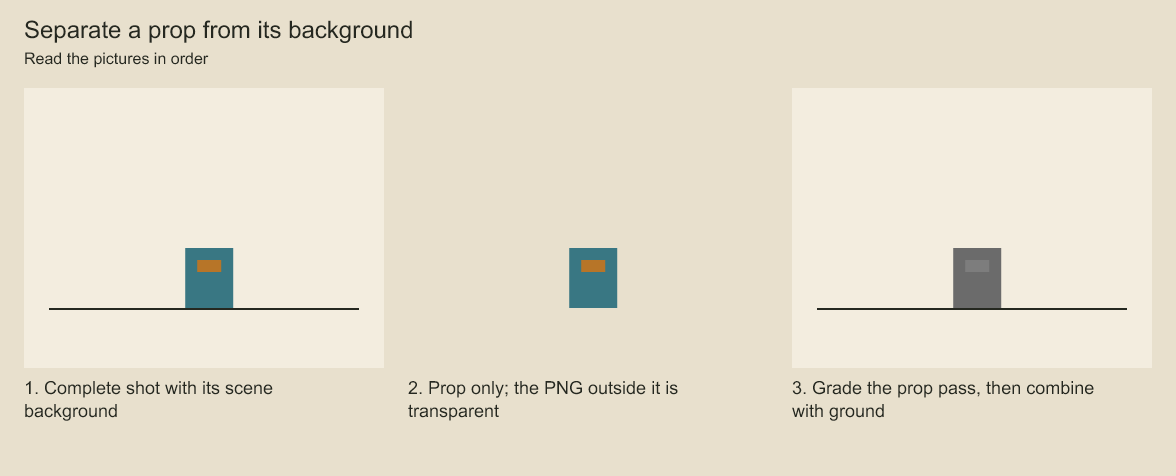
The isolated prop has no ground. The final image combines the desaturated prop with the original ground. Layer selection creates a transparent pass; a saved graph can grade and combine passes.
const pass = { layerIds: ['layer:character'], background: 'transparent' } as const;
const png = await renderShotFramePNG(animation, 12, pass);
const session = createShotRenderSession(animation, pass);

createFrameJob('film.cboard', 'character.cjob', {
  expectedVersion: 12,
  target: { kind: 'shot', animationId: animation.id, render: pass },
});
ShotRenderOptions accepts an optional nonempty list of at most 256 unique layer IDs and
background: 'scene' | 'transparent'. Omitted options preserve full-shot rendering and its
authored background. Selecting a group includes its subtree; selecting a descendant retains
its ancestor transforms, opacity, masks and effects. Hidden layers and drawing holds retain
their authored visibility. The shared compositor evaluates required masks and clipping alpha
even when their artwork is not selected. Invalid IDs/options reject during session creation,
before frame-job creation writes a file. Options and artwork are captured by the session.
Selection controls picture inclusion; the complete shot still supplies controllers, joints, mesh bindings and dependency validation. This is not dependency pruning or a geometry-only render. Selected layers keep their blend modes, so combining isolated passes externally is not guaranteed to reproduce a full render when blends/effects depend on omitted siblings. Alpha is ordinary filtered artwork coverage, not an object-ID, depth or ungraded material AOV.
The job manifest retains its shot target.render options for every worker/retry. Use separate
job files for different passes from the same saved source. Editorial targets do not accept shot
render options. A transparent pass requires an explicit flatten output profile before H.264
delivery; PNG jobs retain alpha. Audio selection remains a separate movie policy and is not
filtered by selected picture layers.
Separate master and review profiles
Fit one picture into a wide frame. What should happen when the output shape changes?
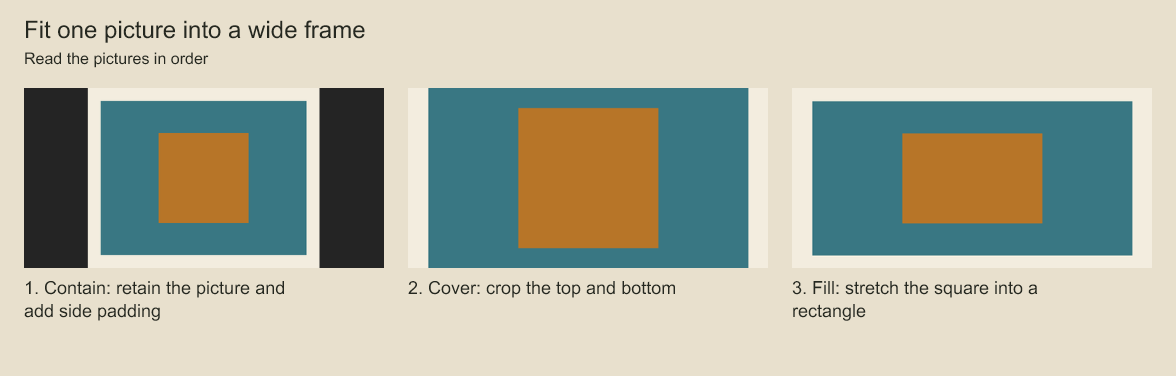
Compare side padding, cropped edges and the stretched central square. Contain, cover and fill are different output choices, applied by real frame jobs.
Create separate jobs against the same saved version to retain a native-size master and a
smaller review. Add outputProfile to the review job options:
outputProfile: {
  width: 1280, height: 720, fit: 'contain', alpha: 'flatten',
  background: { r: 24, g: 24, b: 24 },
}
Profiles are stored in the immutable job definition and reapplied to missing frames on resume.
Dimensions must be positive integers within the 32-megapixel surface budget. contain adds
centered padding, cover crops centrally, and fill stretches to the requested dimensions.
RGB background channels are integers from 0 through 255. alpha: 'preserve' keeps transparency
and uses transparent padding; it does not accept a background. flatten composites against
the explicit opaque background, including padding. Resampling uses Sharp's Lanczos3 kernel
on the renderer's encoded 8-bit PNG. This neither rerenders at a higher resolution nor adds
linear-light compositing, ICC output transforms, HDR or higher-bit-depth masters.
Omitting the profile keeps the original PNG bytes and dimensions. Existing profile-free jobs retain their behavior; older strict readers reject manifests containing the new field. Each job renders independently and has its own storage budget. Profiles are currently configured through the TypeScript API.
Codeboard by Nonom Friedman
Explore Nonom Library