Trim, split and move audio clips
Change a cue without replacing the complete soundtrack. These operations address audio owned by a shot animation or editorial sequence.
Choose the sound, then place it. What is the difference between trimming and moving audio?
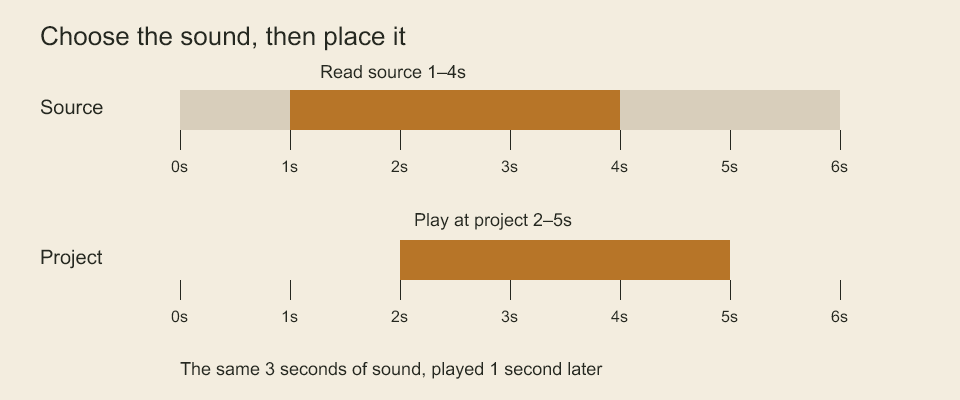
The source bar selects seconds 1 to 4. The project bar places that selection at seconds 2 to 5. Trimming chooses which part of the recording you hear. Placement chooses when you hear it. This diagram itself is silent.
Replace a low tone with a high tone. Will reopening the project play the replacement sound?
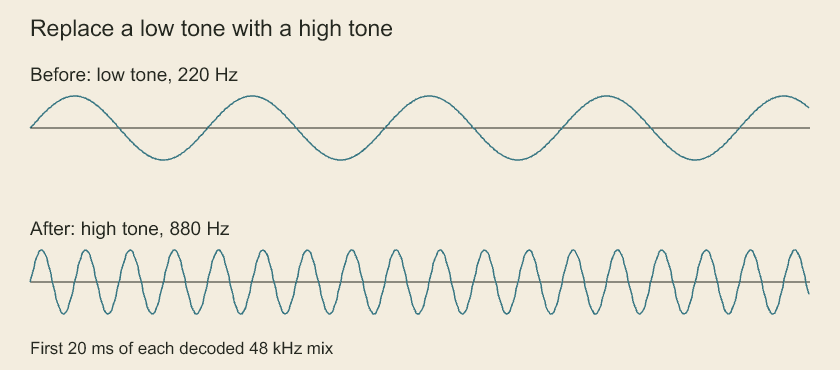
Compare the waves over the same time interval: the higher tone has more cycles. Play the replacement clip to hear it. Replacing an audio asset changes the embedded sound used by the project. The technical checks also cover a missing replacement file.
Edit individual studio audio objects
project.editStudioAudio(ownerId, edits) changes an animation/sequence audio list through the project transaction. reviseStudioAudio(tracks, edits) applies the same algorithm to isolated values and returns the new tracks. Each batch contains 1–1000 ordered edits:
track.addwith completetrack;track.updatewithidandchangesfor name/muted;track.removewithid.clip.addwith destinationtrackIdand completeclip.clip.updatewith stableidand partialchangesfor any field except ID. Supply the complete nestedsourceorstartwhen changing one.clip.movewithid, destinationtrackIdand optionalstart. Omitted start preserves placement and source range; moving within the same track only changes placement when provided.clip.splitwithid, positiveatSampleoffset from the trimmed source start, and explicitnewIdfor the right half.clip.removewithid.
project.editStudioAudio('animation:greeting', [
  { op: 'clip.update', id: 'sound:line-1', changes: {
    source: { sampleRate: 48000, startSample: 30000, sampleCount: 72000 },
  } },
  { op: 'clip.update', id: 'sound:line-1', changes: { fadeOutSamples: 240 } },
]);
Updates can correct trim and fades together before final range validation. Stable IDs remain unchanged; new IDs must be unique. Missing tracks/clips, duplicate IDs or an invalid final state reject without changing the original tracks. Removing a track removes its clips but retains assets. The project mutation additionally checks global IDs and audio asset references. These edits do not ripple picture timing or infer retiming from track array order. Cross-owner moves require explicit remove/add edits in a project transaction; there is no implicit time-domain conversion.
Split studio audio at a source sample
project.editStudioAudio('animation:greeting', [
  {op: 'clip.split', id: 'sound:line-1', atSample: 24000, newId: 'sound:line-1-right'},
]);
atSample counts source samples relative to the current trim, not absolute media position, timeline frames or output-mixer samples. Both halves must be nonempty. The left keeps its ID/start/fade-in; the right receives the new ID, advances source start by the offset and retains the original fade-out. Inner fades become zero. Asset, name, volume and track membership are retained; the right half follows the left in track order. Duplicate IDs and splits through either outer fade reject before replacement (AUDIO_SPLIT_RANGE or AUDIO_SPLIT_FADE in error details for range/fade failures).
Right-hand timeline placement is the exact sum of the original rational start and the source-sample offset. Its tick rate may change to a reduced integer clock; no quantization is introduced by the edit. An unrepresentable safe-integer result rejects with RESOURCE_LIMIT and TIME_SUM_RANGE. For example, a start of 1 tick at 24 Hz plus 1 sample at 48000 Hz becomes 667 ticks at 16000 Hz (exactly 2001/48000 seconds). Stored clip data uses the existing schema; no new persisted split object or media file is created. The same edit works inside studio.audio.edit plans.
The compiler still quantizes each resulting clip to the requested output clock, and the decoder may resample each trim independently. Exact edit placement does not guarantee sample-identical PCM at a different output rate. Listen for seams with the actual source recording and output clock.
Inspect studio audio by owner
const tracks = project.studioAudioTracks('animation:greeting', {limit: 50});
const track = tracks[0];
if (!track) throw new Error('Expected an authored audio track');
const clips = project.studioAudioClips('animation:greeting', track.id, {offset: 0, limit: 50});
The owner is a shot-animation or editorial-sequence ID. Track results contain id, name, muted and clipCount; clip results contain the complete sample ranges, rational start, volume and fades. Use a known track ID or check that a track exists before indexing the array. Missing owners or tracks reject; an existing owner without audio returns an empty track page. Reads copy only selected metadata and never return live arrays. Both methods use the standard offset/default-50/maximum-200 count limit and retain authored order. Restart offset pagination after edits. The existing editStudioAudio operation applies revisions.
Codeboard by Nonom Friedman
Explore Nonom Library