Decode and mix audio
Use a decoder to read saved media, then mix a shot or edit into stereo PCM. Listen to the mix and check clipping before encoding it.
Hear the cue inside the silence. Does the exported sound start and stop where you placed it?
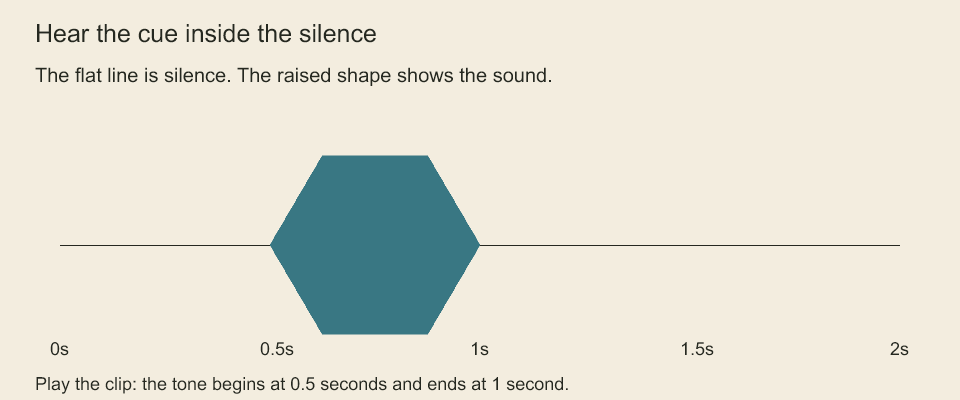
Play the two-second clip. Listen for the tone between 0.5 and 1 second, and compare that interval with the waveform. The waveform comes from decoded mixed audio. The clip contains a generated tone, not speech.
Mix PCM through a decoder adapter
mixShotAudio(animation, decoder, options) and mixEditorialAudio(sequence, animations, decoder, options) run conform and mix actual PCM into stereo Float32 channels. Editorial options require transitions: 'sum' | 'linear'. Both accept sampleRate (default 48000, supported 8000–192000), maxSamples (default/hard maximum 16777216 per channel for output and each decoded clip), and signal. Inputs are validated and conformed before the first asynchronous decode.
Use range: {startSample, endSample} for a nonempty half-open window in the output sample rate. Both positions must be safe integers within the full conformed timeline. The returned channels start at that window's first sample; result.range records its absolute bounds, while result.conform still describes the complete timeline. Omitting the option mixes the full timeline and reports that full range. Peak/clipping statistics cover only the returned window. Fades and editorial ramps are evaluated at their original positions, not restarted at zero. Clips wholly outside the window are skipped; each intersecting clip is still fully decoded and must fit maxSamples. This bounds output allocation but does not implement streaming source decoding.
The decoder receives AudioDecodeRequest: asset ID, declared source sample rate, original start/count, output sample rate/count and optional abort signal. It must verify the asset's sample rate and range, trim in original sample units, resample, and return exactly the requested number of samples as one or two Float32Array channels. Mono duplicates into left/right; stereo retains its channels. Hand ownership of those arrays to the mixer until it returns. Pin media bytes in the adapter so repeated calls cannot resolve different versions. The FFmpeg decoder below supplies this adapter for supported media.
The mixer validates returned channel shapes, rejects invalid consumed samples/overflow, applies linear volume, original clip fades and absolute transition ramps, then sums overlapping segments. Fade-in starts at zero on the first faded sample; fade-out ends at zero on the last clip sample. Editorial cropping keeps that original fade phase. Output is not normalized, limited or clipped. The result includes sampleRate, stereo channels, peak, clippedSamples (individual channel samples with absolute value above 1), and the conform report. Silent gaps are zero. Inspect clipping before delivery; encodeWav(result.channels, result.sampleRate) converts to PCM16 and clips values outside ±1.
Mixing yields between 65536-sample blocks and checks cancellation around decoding and blocks. Decoder cancellation still depends on the adapter honoring its signal. Repeated shot occurrences may decode the same clip again; there is no retained media cache. Bounds cover mixer output and requested decoded clip lengths, not caller-owned input assets, source artwork or a misbehaving adapter's allocations. Studio movie export consumes this PCM mix and rejects clipping before encoding.
FFmpeg decoder adapter
const decode = createFFmpegAudioDecoder(project.captureAssetReader(), {
  ffmpegPath: '/tools/ffmpeg',
  ffprobePath: '/tools/ffprobe',
});
const mix = await mixShotAudio(project.shotAnimation('animation:greeting'), decode);
createFFmpegAudioDecoder(readAsset, options) takes a synchronous/asynchronous reader of asset bytes. It copies each input and pins its SHA-256 at first use; a subsequent change to the same asset ID rejects. Pins live only in this decoder instance and do not replace project asset checksums or durable provenance. The reader remains responsible for resolving the intended project/revision and can still allocate memory before the decoder checks it.
The adapter probes the first audio stream with ffprobe, checks the declared source rate and accepts mono/stereo at 8–192 kHz. It decodes the requested original sample range to float PCM and requires the exact source count, then resamples when needed. Native trim uses atrim sample counts; probe fields use ffprobe stream entries. Samples address decoded audio rather than compressed packet offsets. Output uses the requested nearest-rounded count; one extra trailing resampler sample is discarded, while short or larger-than-budget output rejects. Nonfinite PCM rejects. No silence is inserted to hide missing source samples.
ffmpegPath/FFMPEG_PATH select FFmpeg; ffprobePath/FFPROBE_PATH select ffprobe independently, otherwise each executable is found on PATH. Each process has a default 30-second timeout (configurable up to 120 seconds), bounded stdout and 12 KiB stderr retention. Asset bytes default to 64 MiB with a configurable hard maximum of 256 MiB; source/output clips are limited to 16777216 samples per channel. Input protocols are restricted to the byte pipe, so containers needing seekable files or external resources may reject. This is not universal codec support. Child processes are hidden, receive arguments directly and are cancelled/killed on failure or limits. Asset reader cancellation is caller-owned; PCM unpacking yields in blocks. Studio movie mixing can use this adapter.
Codeboard by Nonom Friedman
Explore Nonom Library