Add sound to shots and edits
Place audio on an independent shot or on the assembled edit. Keep source trim in samples and timeline placement in its declared clock.
Choose the sound, then place it. What is the difference between trimming and moving audio?
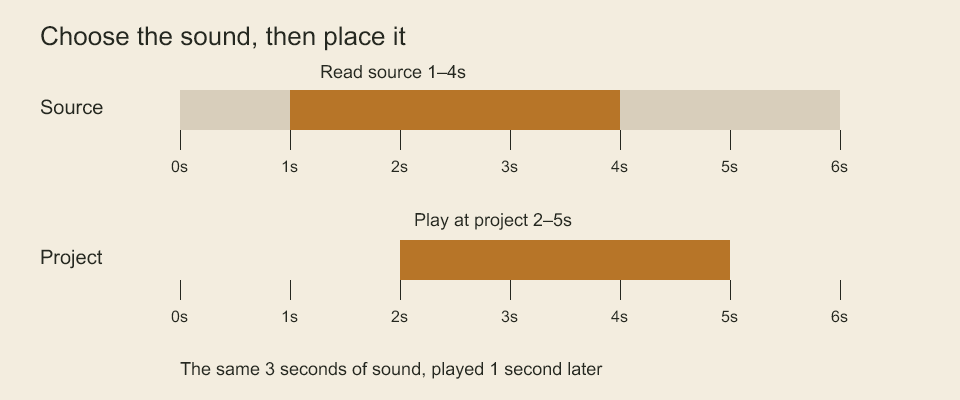
The source bar selects seconds 1 to 4. The project bar places that selection at seconds 2 to 5. Trimming chooses which part of the recording you hear. Placement chooses when you hear it. This diagram itself is silent.
Studio audio clocks
Shot animations and editorial sequences can store audio tracks independently of board tracks. Omitted audio means no tracks. project.setStudioAudio(ownerId, tracks) replaces the complete track list for an animation or editorial sequence through the project transaction. Empty arrays clear it. Track/clip IDs are unique across the project; audio assets must already exist or be created earlier in the same transaction. Discovery exposes studio-audio-track and studio-audio-clip kinds. Existing board audio methods address only board tracks.
const tracks = defineStudioAudio([{
  id: 'sound:dialogue', name: 'Dialogue', muted: false,
  clips: [{
    id: 'sound:line-1', assetId: 'asset:voice', name: 'Opening line',
    start: { ticks: 12, rate: { numerator: 24, denominator: 1 } },
    source: { sampleRate: 48000, startSample: 24000, sampleCount: 96000 },
    volume: 1, fadeInSamples: 240, fadeOutSamples: 480,
  }],
}]);
project.setStudioAudio('animation:greeting', tracks);
const placements = compileStudioAudio(tracks, 48000);
start is a nonnegative rational time measured from the owning shot/sequence origin. Its rate means ticks per second, so the example starts at half a second. source.startSample and source.sampleCount address the original media's sample clock; the end is exclusive. Fades use that source sample clock as well. Rate values normalize to reduced fractions. These fields declare the intended media timing; registration does not prove the actual sample rate, decoded duration or codec. The FFmpeg adapter verifies media metadata/ranges, and studio movie export can use its PCM mix.
compileStudioAudio(tracks, outputSampleRate) returns unmuted clip placements and copies of their source records. Start/count/fade outputs are TimeConversion values with exactness and reduced quantization error. Conversion uses nearest rounding with positive ties upward; it does not resample PCM, read files, stretch audio or clamp clips to a movie duration. Invalid source ends, overlapping fades, duplicate IDs, unsafe output positions and clip collapse at the chosen sample rate reject. Fades that become overlapping after conversion also reject. Volume is a nonnegative linear gain, without automatic normalization/limiting.
Studio movies require an explicit mix or omission policy when unmuted tracks exist. Use the export APIs described in export; --mix-audio sum|linear or --omit-audio selects the CLI policy. Muting changes authored data; selecting omission changes only this export. Board movie audio retains its existing behavior.
Conform shot audio to an edit
conformShotAudio(animation, sampleRate = 48000) crops unmuted audio to the shot duration. conformEditorialAudio(sequence, animations, { sampleRate, transitions }) maps shot audio into each editorial clip, combines it with sequence-owned tracks and returns an AudioConform. This is an executable timing calculation; it does not decode or mix PCM.
const conform = conformEditorialAudio(sequence, animations, {
  sampleRate: 48000,
  transitions: 'linear',
});
Choose transitions: 'sum' to retain both sources at their authored gain during picture overlaps, or 'linear' for linear amplitude crossfades across each overlap. Dissolves and wipes use the same selected audio policy. No equal-power curve or normalization is implied. Sequence-owned tracks are independent and receive no picture-transition envelope.
Each segment retains its owning animation/sequence, editorial clip ID when applicable, original compiled audio clip, output start/count and clipOffsetSamples. The offset addresses the already-trimmed/resampled audio clip, so authored fade envelopes continue from their original position rather than restarting at an editorial cut. Transition ramps contain absolute output-sample ranges and endpoint gains; multiply them with authored clip fades and volume. Ramp evaluation clamps outside its endpoints. A reused shot produces separate segments for each editorial occurrence.
Source-in uses the shot rate; clip start/end use the editorial rate. All boundaries are converted to one output sample clock with nearest rounding and reported quantization. windows records converted source-in, source duration limit and absolute output endpoints for each clip. Window duration is the difference of converted absolute endpoints, avoiding accumulated per-clip duration rounding. Audio is cropped to each source window, the shot's declared duration and the editorial output duration. It plays at normal speed; it is not duplicated at video frame boundaries or stretched to match source frame counts. The last video frame can outlast available source audio at mixed rates; any resulting tail is silent.
Muted tracks contribute no segments. Silent gaps remain gaps, clips outside the window contribute nothing, and collapsed output clips/transitions or unsafe arithmetic reject. Empty segment lists are valid silent output. The resulting data and gain ramps still require a decoder/mixer before WAV or movie audio delivery; source rate/duration declarations remain unverified against media bytes.
Codeboard by Nonom Friedman
Explore Nonom Library