Review and revise
Make review part of your authoring loop: run a script, render the relevant view, inspect the image, then change only the artwork or timing that needs attention.
Find the target
import { StoryboardProject } from 'codeboard-studio';
const project = await StoryboardProject.open('film.cboard');
console.log(project.production.find({ name: 'Hand', limit: 20 }));
Results include stable IDs, kinds, and ownership. Narrow a query with panelId or kind. Read one item with production.layer(id) or production.element(id). Avoid reading the entire document when you only need one hand or layer.
Render a useful view
Draw toward a vanishing point. Where should the floor lines meet?
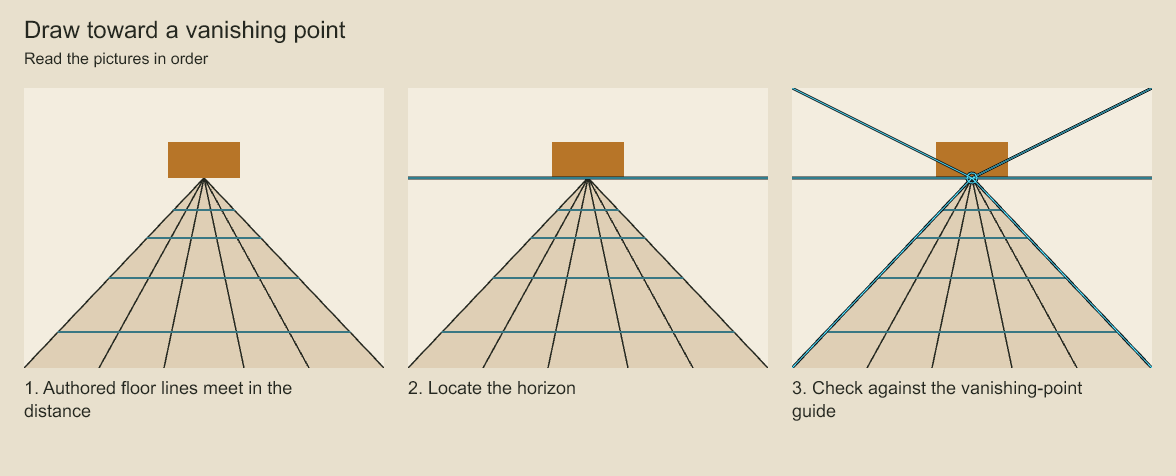
Compare the authored floor with the horizon and vanishing-point overlays. The guides help inspect a drawing. They do not generate perspective geometry or turn the scene into 3D.
import { renderFramePNG, renderDetail, renderContactSheet, renderFrameSheet } from 'codeboard-studio';
import { writeFile } from 'node:fs/promises';

await writeFile('frame.png', await renderFramePNG(project, 24));
await writeFile('hand.png', await renderDetail(project, 'notice', {
  x: 420, y: 220, width: 240, height: 200,
}, 24));
await writeFile('sheet.png', await renderContactSheet(project, {
  panelIds: ['notice', 'reach'], columns: 2,
}));
await writeFile('timing.png', await renderFrameSheet(project, [0, 12, 24, 36]));
Replace panel IDs and frames with those in your project. A contact sheet compares panel compositions. A frame sheet compares exact moments, including drawing substitutions and camera motion. A crop lets you inspect line quality and anatomy at full detail.
Compare layers with onion skin
See motion without changing the drawing. What can review overlays reveal?
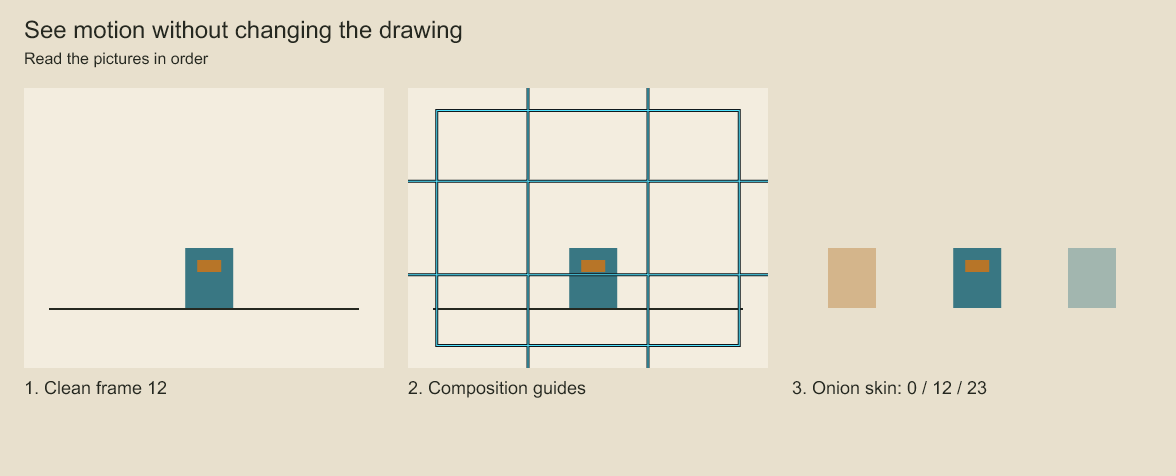
Compare the clean frame with composition guides and then the ghosted positions. The ghosts show where the prop was and where it is going. Review overlays add information to an exported view while leaving the source artwork alone.
import { renderOnionSkin } from 'codeboard-studio';
await writeFile('onion.png', await renderOnionSkin(project, [
  { panelId: 'notice', frame: 12, layerIds: ['hand-track'], tint: '#b95741' },
  { panelId: 'notice', frame: 18, layerIds: ['hand-track'], tint: '#357c9c' },
], { opacity: .4, camera: false }));
Each sample can select particular layers and its own tint or opacity. Omit layerIds to compare complete panels. Use camera: false for source-pose comparison and camera: true to include camera placement. Up to eight samples can be combined.
Apply a reversible change
Try a change and return to the original. Can you recover the drawing before an edit?
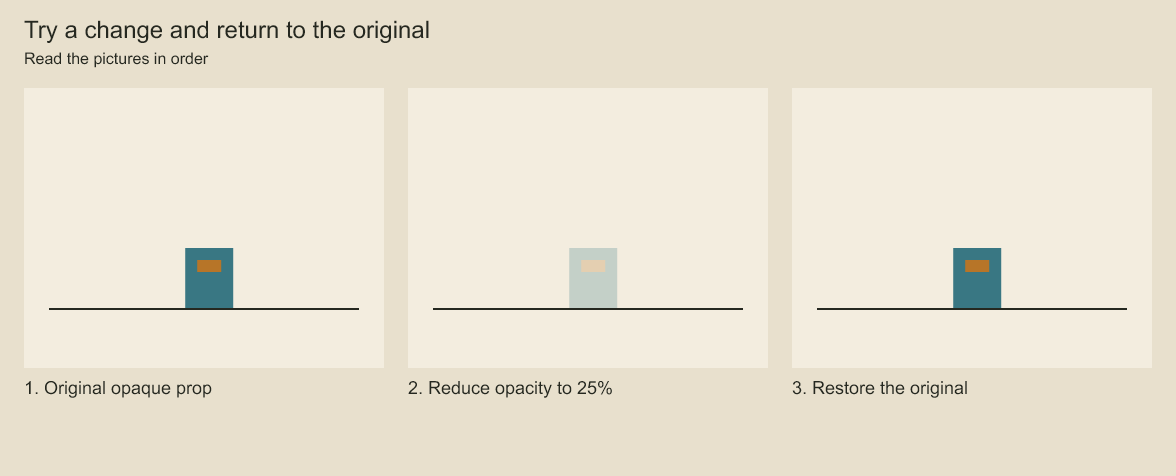
The prop becomes translucent in the middle image. The restored image returns to the opaque original. A saved checkpoint lets you return to an earlier state after making a change.
const beforeVersion = project.version;
project.transaction('Adjust hand position', () => {
  project.select({ panelId: 'notice', layerId: 'hand-track' })
    .transform({ x: 20, y: -8 });
});
console.log(project.production.changesSince(beforeVersion, { limit: 20 }));
await writeFile('revised.png', await renderFramePNG(project, 18));
Inspect revised.png. Keep the change with await project.save('film.cboard'), or reject it with project.undo(). redo() reapplies an undone edit. Transaction callbacks are synchronous; render and save after the transaction ends.
For a longer pause before a reveal, use setPanelDuration(panelId, frames, 'ripple'). For closer framing, edit a camera key. For a malformed contour, use layer.edit to change the geometry. Each request has a more precise operation than regenerating the entire scene.
Check coordinates
import { transformPoint } from 'codeboard-studio';
const space = project.production.coordinates('hand-track', { frame: 18, camera: true });
const framePoint = transformPoint(space.localToFrame, { x: 30, y: 20 });
The inverse frameToLocal maps a point in the rendered frame back into source coordinates. It is null when the transform cannot be inverted, for example at zero scale.
Codeboard produces review images and change information. Your agent or reviewer decides whether the pose, composition, or timing is good.
Attach a review note
const note = project.production.comment('Keep the rear foot planted here.', {
  panelId: 'notice', layerId: 'hand-track', frame: 18, x: 450, y: 240,
}, { author: 'Reviewer' });
// After applying and inspecting the correction:
project.production.resolveComment(note);
Comments preserve feedback and an optional artwork/frame anchor. They do not execute changes. Review notes and panel status are stored with the project. production.inspect() returns the project overview, including timeline, assets and open comments; it is not paginated. Use production.find() and paged key/audio queries for bounded discovery in large projects. See the production reference for return shapes.
Protect a reviewed part
const lock = project.production.lock('layer', 'hand-track', 'Pose review in progress');
project.production.unlock(lock);
A lock belongs to the project's current actor and blocks edits by other actors. Its owner can continue editing and is the only actor who can unlock it. Choose an actor with StoryboardProject.open(path, { actor: 'agent:cleanup' }) when ownership matters across sessions. Locks coordinate edits inside the document; they are not operating-system access control or a network collaboration service.
For detailed ghosting rules, follow onion skin, layer by layer. For framing overlays, see camera guides.
Codeboard by Nonom Friedman
Explore Nonom Library