Grade, blur and shadow a layer
Apply effects to a layer or to the combined artwork in a group. Stack order changes the result; render after changing it.
Change the appearance of a layer. What happens when you apply one effect at a time?
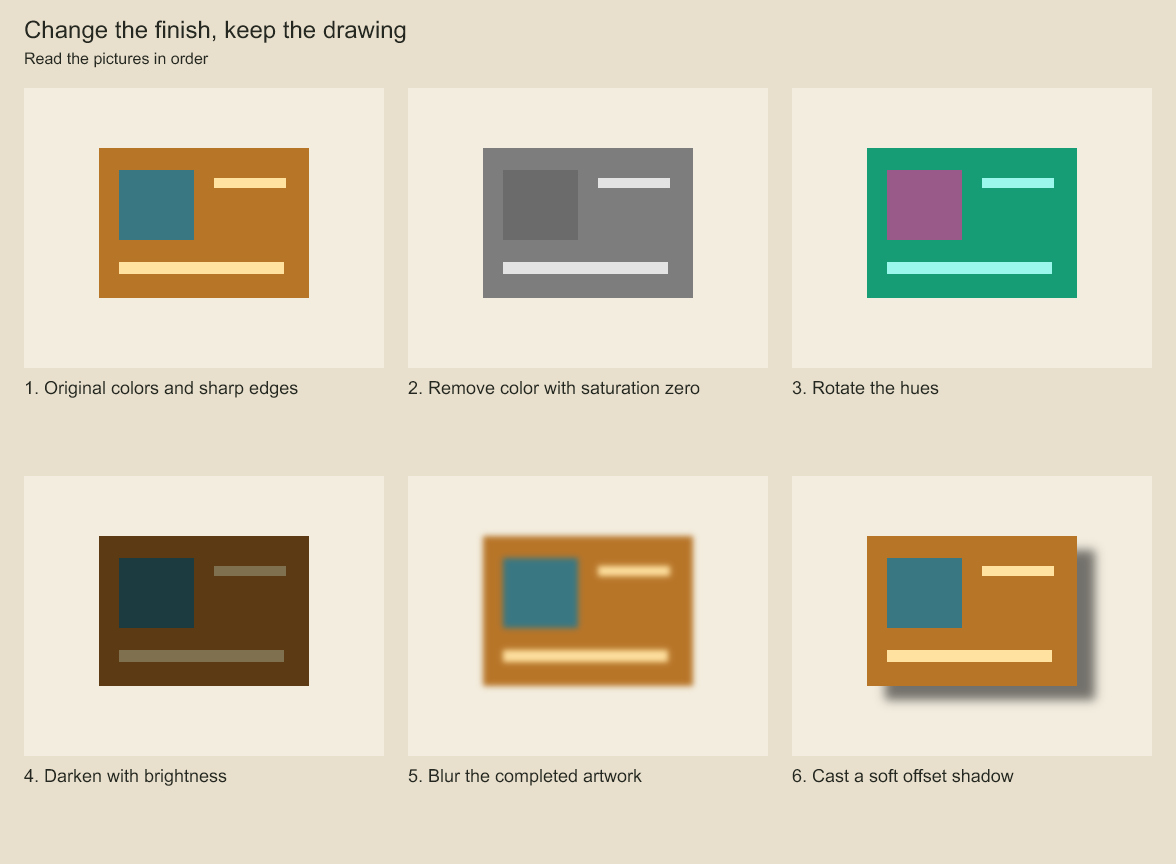
Compare the original colors and edges with each labeled effect. Effects change rendered appearance while preserving source artwork.
Apply an ordered effect stack
character.set({ effects: [
  { kind: 'saturation', amount: 0.6 },
  { kind: 'contrast', amount: 1.15 },
  { kind: 'brightness', amount: 0.9 },
  { kind: 'hue-rotate', degrees: 12 },
] });
// Clear the stack without changing source artwork or palette bindings.
character.set({ effects: [] });
LayerOptions.effects accepts the same stack at creation. For shot animation, use
{op: 'layer.set', layerId, changes: {effects: [...]}} through the existing shot edit/plan
workflow. Effects persist with layers, including group/component source trees. They do not
rewrite source colors, palette references or drawing geometry. Color-effect amounts are finite numbers from
0 through 10, with 1 meaning unchanged; hue rotation is in degrees from -360 through 360,
with 0 meaning unchanged. At most 16 effects are accepted per layer. Unknown kinds and fields
reject at the schema boundary. Array order is evaluation order and can change the result.
Every slot runs as a separate filter pass, including repeated kinds; two brightness slots do
not overwrite each other. Intermediate results use the current 8-bit backend, so combining
two slots into a mathematically equivalent single filter need not be pixel-identical.
The compositor filters the completed layer after artwork/mesh rendering and its explicit mask, then applies sibling clipping, layer opacity and blend. Group effects operate on the composed children; child effects run first. These color effects preserve alpha. A mask layer's color effects consequently do not change its alpha mask. Layers without effects retain the existing direct-render path; filtered layers use an isolated surface so overlapping marks are graded together.
Evaluation uses the installed Skia Canvas filter API and the existing 8-bit surfaces. For multiple image inputs, use the shot compositing graph, which shares this effect evaluator. Neither path provides a linear-light/HDR pipeline or LUT/ICC transform. Older engine versions do not understand the new layer field and may discard it; keep the authoring engine pinned when sharing projects.
Blur a layer or group
character.set({ effects: [{ kind: 'blur', amount: 4 }] });Blur amount is a Gaussian standard deviation from 0 through 128 in the current composition
surface's logical units; 0 leaves the image unchanged. The renderer scales it by that surface's
sampling resolution. Blur runs after layer/ancestor placement within that surface, so scaling
an individual layer does not scale its blur amount. Camera-plane placement happens afterward.
Inside a deformed group's texture, units are the group's bind-space units and the filtered
child result subsequently deforms with that texture. Applying blur to the deformed group itself
instead filters its warped result. An effective standard deviation above 512 surface pixels
rejects with RESOURCE_LIMIT before allocating the layer's source/output surfaces.
Blur spreads color and alpha, including a mask layer's alpha. A layer's own mask is applied
before its blur, so the blurred result can spread past that mask edge. Sibling clipping runs
after effects and cuts the blurred result to the preceding sibling's alpha. For a sharp outer
mask around blurred content, place the content in a masked parent group. For each blur, the
renderer adds a finite sampling margin of ceil(4 * sigma) pixels per side, summed across
the stack. It renders artwork and masks into the expanded surface, evaluates the filters,
then crops to the requested bounds. Nested groups add their margins recursively. This allows
nearby offscreen artwork to contribute without changing output dimensions or placement.
Expanded surfaces remain subject to the 32-megapixel budget and reject rather than reduce
quality silently. Large blur stacks can therefore exceed the budget even on a smaller frame.
Blur uses a finite sampling margin, so it approximates an infinite Gaussian. Mesh triangles remain the domain of mesh-warped geometry: child blur can sample outside a bind texture before cropping, but does not extend the mesh's triangle coverage. Put blur on the mesh-bound group itself to spread its warped silhouette.
Cast a colored shadow
character.set({ effects: [{
  kind: 'shadow', amount: 4, offsetX: 12, offsetY: 8,
  color: { r: 20, g: 24, b: 32 }, opacity: 0.6,
}] });
Shadow casts the current layer/group surface's alpha silhouette behind that surface, retaining
the original image. amount controls the backend drop-shadow blur from 0 through 128; zero
produces a hard shadow. Offsets are signed composition-surface units from -4096 through 4096,
following the same placement/resolution rules as blur. RGB channels are explicit integers
from 0 through 255; shadow opacity is from 0 through 1 and does not change the original image's
opacity. Color is static; blur, offsets and opacity can be animated independently. This is a
2D silhouette shadow, with no inferred lights, scene depth, receiving geometry or occlusion.
The shadow sees the layer's explicit mask and earlier effects. Later effects process the image and its shadow together. Sibling clipping applies afterward; a parent mask can cut both. Two shadow slots run sequentially, so the second also sees the first shadow's alpha. To cast from the combined child silhouette, apply the effect to their group. For mesh-warped artwork, put shadow on the bound group to cast from its warped result; child effects still obey triangle coverage. Shadow colors do not create or modify palette bindings.
The renderer expands each side by ceil(max(abs(offsetX), abs(offsetY)) + 4 * amount) in
surface pixels, summed with other effects' margins before cropping. Effective blur over 512
pixels or either effective offset over 4096 pixels rejects before allocating the layer surface;
the expanded surface must also fit the 32-megapixel budget. These are conservative finite
sampling bounds, not infinite Gaussian support.
Animate effect parameters
Use the existing layer keyframe API. effectValues addresses zero-based positions in the
effect stack; without channel, its value replaces amount or degrees for that effect:
project.production.addLayerKeyframe(character.id, 0, {
  effectValues: [{ index: 0, value: 0, easing: 'ease-in-out' }],
});
project.production.addLayerKeyframe(character.id, 23, {
  effectValues: [{ index: 0, value: 1 }],
});
For shot-local keys, put the same effectValues on layer.key.put with an explicit key ID,
frame, transform: {} and easing. Existing keys may combine transforms and effects.
Each slot interpolates independently using the outgoing entry's easing, falling back to its
keyframe easing. Before/after its first/last key it holds the nearest keyed value. An unkeyed
slot uses its static value. Key entries must have unique index/channel pairs, existing effect slots and
values within that effect's range. Hue values interpolate numerically, without shortest-arc
wrapping. Shared easing supports hold, linear, ease-in-out and bounded cubic Bezier.
Negative hue is converted to its equivalent nonnegative angle only at the backend boundary,
after interpolation. Unit-bearing filter values use decimal notation so very small animated
blur/hue values cannot be misread as an exponent by the backend's CSS parser.
Shadow additionally supports channel: 'offsetX' | 'offsetY' | 'opacity'. Named channels
reject on other effect kinds. Each channel has independent keys, endpoint holds and easing;
an omitted channel uses its static field. Up to 64 values may share one layer keyframe, enough
for four parameters across 16 shadow slots:
project.production.addLayerKeyframe(character.id, 0, {
  effectValues: [
    { index: 0, value: 2 }, // shadow blur amount
    { index: 0, channel: 'offsetX', value: -12 },
    { index: 0, channel: 'offsetY', value: 4 },
    { index: 0, channel: 'opacity', value: 0.3 },
  ],
});
project.production.addLayerKeyframe(character.id, 23, {
  effectValues: [
    { index: 0, value: 6 },
    { index: 0, channel: 'offsetX', value: 12 },
    { index: 0, channel: 'offsetY', value: 10 },
    { index: 0, channel: 'opacity', value: 0.7 },
  ],
});
Board add/update replaces the supplied effectValues array; omitting it preserves the old
entries. Supply all entries to retain at that frame. An empty array clears the effect values
only when another property remains authored; remove an effects-only key with the normal key
removal API. Removing transform channels preserves effects on the same key. Reordering the
stack requires remapping its indexed keys; clearing a referenced stack rejects until those
keys are revised. Board capture, ripple/retime, FPS conversion and copying move the existing
keyframe records, so effect timing follows them and uses their collision checks.
Codeboard by Nonom Friedman
Explore Nonom Library