Curves, coordinates, and IK
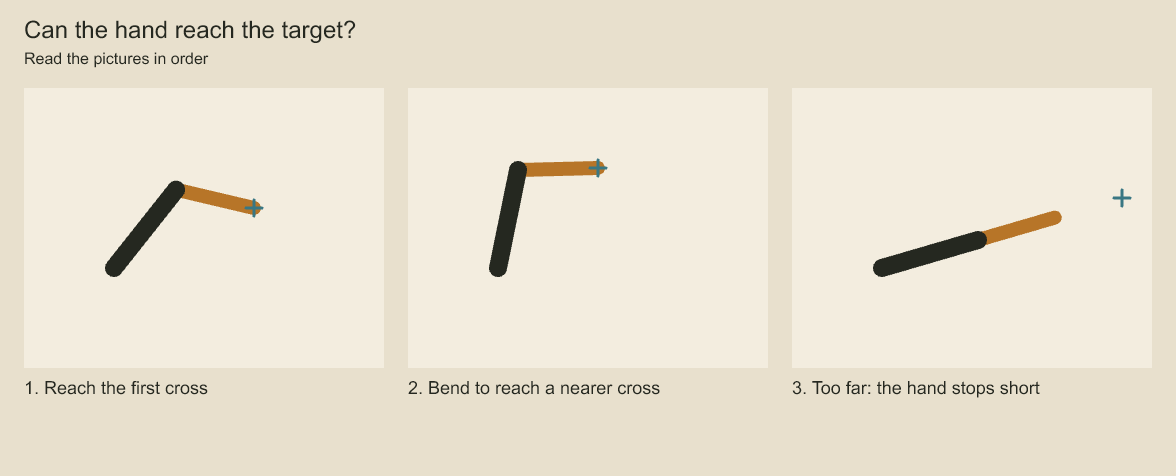
The target cross in the final panel is beyond the combined 180-unit reach. Check reachable rather than assuming the solver reaches every target.
Use math helpers to generate pen paths and map a review observation back into artwork coordinates. They produce geometry or transforms; they do not evaluate whether a drawing is anatomically correct.
Generate a pen path
import { catmullRom, withPressure, translate } from 'codeboard-studio';
const arc = catmullRom([
  { x: 0, y: 80 }, { x: 80, y: 0 },
  { x: 180, y: 10 }, { x: 260, y: 90 },
], 16);
const placed = translate(withPressure(arc, t => .2 + .8 * Math.sin(Math.PI * t)), 100, 150);
catmullRom interpolates control points. cubic samples a cubic Bézier. samplePath samples editable M, L, Q, C, and Z commands. Use line, ellipse, hatchPolygon, mirrored, scale, and translate for reusable construction. Sample density affects the supplied pen path; renderer brush spacing controls stamps along it.
Procedural drawing functions use ordinary JavaScript or TypeScript to compute points and call the public drawing API.
Convert between spaces
Use a layer ID discovered in your project and a global board frame. project is an open StoryboardProject; layerId and frame refer to the artwork and moment being corrected. For shot-local artwork, use project.shotCoordinates(animationId, layerId, { frame }).
import { transformPoint } from 'codeboard-studio';
const space = project.production.coordinates(layerId, { frame, camera: true });
const framePoint = transformPoint(space.localToFrame, { x: 0, y: 0 });
if (space.frameToLocal) {
  const localPoint = transformPoint(space.frameToLocal, framePoint);
  console.log(localPoint);
}
Nested group placement, animated transforms, and camera framing can make a screen-space correction different from a local-space correction. Use the matrices returned for the intended frame rather than subtracting a guessed offset.
matrixFromTransform builds an affine matrix, multiplyMatrices composes two matrices, and invertMatrix returns the inverse. Matrices use [a, b, c, d, e, f]: x′ = ax + cy + e, y′ = bx + dy + f. Rotation uses radians. A singular or numerically unstable inverse throws; the coordinate query reports an unavailable inverse as null.
Solve a two-bone reach
import { solveTwoBoneIK } from 'codeboard-studio';
const pose = solveTwoBoneIK(
  { x: 0, y: 0 }, { x: 100, y: 40 }, 80, 60, 1,
);
console.log(pose.rootRotation, pose.elbowRotation, pose.reachable, pose.error);
Lengths must be positive. Bend is 1 or -1. An unreachable target produces the nearest supported reach with reachable: false; inspect error rather than assuming the end landed on the target.
To pose actual layer joints, create a root group and an immediate elbow child at (upperLength, 0), then use setTwoBoneRig and poseTwoBoneRig. Joint scale must remain one and pivots must stay at the origin; scale an ancestor instead. This is a two-joint transform rig, not mesh deformation or automatic rigging of a flat image.
const shoulder = panel.addGroup('Shoulder', { transform: { x: 300, y: 300 } });
const elbow = panel.addGroup('Elbow', { transform: { x: 80, y: 0 } }, shoulder.id);
panel.addVectorLayer('Upper arm', {}, shoulder.id).vectorStroke(
  [{ x: 0, y: 0 }, { x: 80, y: 0 }], { width: 12, color: '#f48136' },
);
panel.addVectorLayer('Forearm', {}, elbow.id).vectorStroke(
  [{ x: 0, y: 0 }, { x: 60, y: 0 }], { width: 10, color: '#bb5627' },
);
project.production.setTwoBoneRig(shoulder.id, {
  elbowId: elbow.id, upperLength: 80, lowerLength: 60,
});
const result = project.production.poseTwoBoneRig(shoulder.id, 0,
  { x: 400, y: 340 }, { bend: 1, easing: 'hold' });
console.log(result.reachable, project.production.twoBoneRig(shoulder.id));
The target uses the root joint's parent coordinates. Here the shoulder is at (300, 300) and the target is 100 units right and 40 down from it. Posing writes rotation keys on the two joints. Removing the rig definition with setTwoBoneRig(rootId, null) removes the rig relationship; it does not automatically delete already-authored rotation keys.
Use finite coordinates and positive bone lengths. Check the returned reachability before keeping a pose.
Codeboard by Nonom Friedman
Explore Nonom Library