Animate a 3D scene
Add a primitive scene to a vector layer with LayerHandle.scene3D. The .cboard retains its solids, group hierarchy, camera, lights, materials, and keyframes. Opening the project and rendering a different frame evaluates the saved scene again. This API is available in the source checkout for the next minor release.
Turn three solids around one pivot. How do the silhouettes change as the group turns?
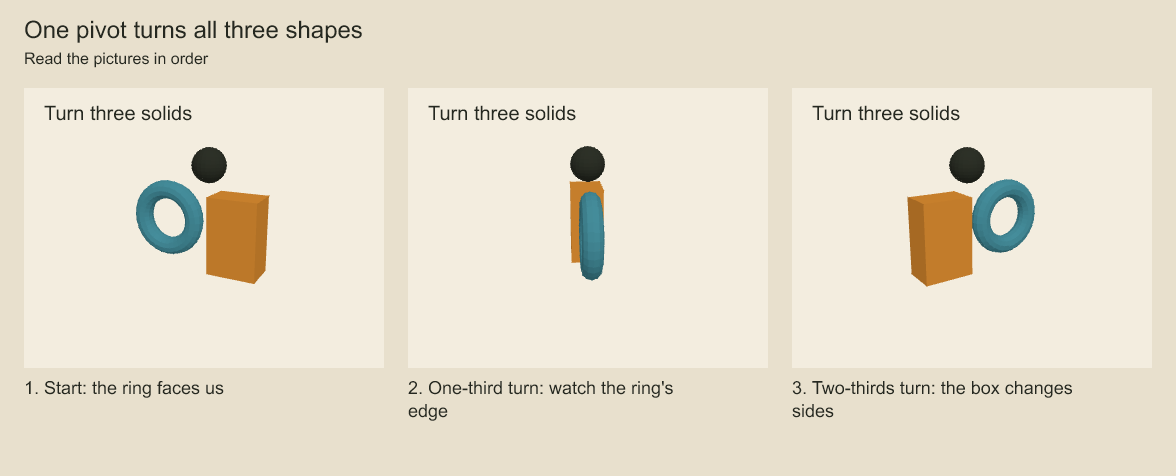
The ring becomes narrow when seen edge-on. The box and sphere keep their position relative to the same pivot, while the 2D title stays still. The saved project retains the solids, camera, lighting, and rotation keys. Each frame projects the scene again.
Turn a box
import { StoryboardProject, renderFramePNG } from 'codeboard-studio';
import { writeFile } from 'node:fs/promises';

const project = StoryboardProject.create({
  title: 'A turning box', width: 640, height: 480, frameRate: 24,
  background: '#f3eddf',
});
const panel = project.addScene('Solids').addShot('Turn').addPanel({ durationFrames: 49 });
const layer = panel.addVectorLayer('3D artwork');
const elementId = layer.scene3D({
  width: 640, height: 480,
  camera: {
    kind: 'perspective', fov: 40,
    position: [3, 2, 6], target: [0, 0, 0],
  },
  lights: [
    { kind: 'ambient', color: '#ffffff', intensity: 0.5 },
    { kind: 'directional', color: '#ffffff', intensity: 0.9,
      position: [3, 5, 4], target: [0, 0, 0] },
  ],
  nodes: [{
    id: 'box', kind: 'mesh', geometry: 'box', scale: [1.5, 2, 1],
    material: { kind: 'lambert', color: '#b77528' },
    keyframes: [
      { frame: 0, rotation: [0, 0, 0], easing: 'linear' },
      { frame: 48, rotation: [0, Math.PI * 2, 0], easing: 'linear' },
    ],
  }],
}, { name: 'Turning box' });

await project.save('box.cboard');
const reopened = await StoryboardProject.open('box.cboard');
await writeFile('middle.png', await renderFramePNG(reopened, 24));

reopened.panel(panel.id).layer(layer.id).edit(elementId, (element) => {
  if (element.kind !== 'scene-3d') throw new Error('Expected a 3D scene');
  const box = element.scene.nodes.find((node) => node.id === 'box');
  if (box?.kind !== 'mesh') throw new Error('Missing box');
  box.material.color = '#397783';
  return element;
});
await reopened.save('box.cboard');
Use the ordinary movie export or frame sequence operations. The same scene evaluation runs in board, shot, and editorial rendering. A new render session reads the edited project; an existing session keeps its original snapshot.
Scene space and timing
Coordinates are right-handed world units, with positive Y up. Nodes default to position [0, 0, 0], rotation [0, 0, 0], and scale [1, 1, 1]. Rotation uses Euler XYZ radians, as in Three.js. Values interpolate directly: 0 to Math.PI * 2 makes a full turn. This MVP does not use quaternion interpolation.
The camera looks from position toward target, with world Y as its up direction. Perspective fov uses degrees; orthographic height is the visible vertical span in world units. Aspect ratio comes from the scene viewport. Near and far planes default to 0.1 and 1000. Camera position and target can also have keyframes. A coincident camera position and target rejects at render time, including a collision caused by interpolation.
Node id values are unique within the scene. Set parentId to a group node to inherit its transform and visibility. These internal IDs are not project selection IDs. Edit them through the containing element. Copying the element keeps the internal hierarchy independent of its source.
Node keys can set position, rotation, or scale; camera keys can set position or target. Each vector interpolates independently between the nearest keys that specify it. Before its first key and after its last key, a channel holds that endpoint. Without keys, it uses the base value. Easing belongs to the outgoing key and accepts linear, hold, ease-in-out, or Codeboard's cubic Bezier easing.
Keyframes use the containing artwork's time domain: global frames in a board panel, local frames in a shot animation. Board capture, panel moves, ripple retiming, frame-rate conversion, shot retiming, and character-instance offsets also transform the embedded 3D keys. Retiming that merges distinct keys rejects atomically. Static components remove animation and retain the base scene pose, like ordinary layer transforms.
Shapes and appearance
| Geometry | Unscaled size |
|---|---|
box | 1 x 1 x 1 |
sphere | Radius 0.5 |
cylinder | Radius 0.5, height 1, along Y |
cone | Radius 0.5, height 1, along Y |
plane | 1 x 1, in the XY plane |
torus | Major radius 0.5, tube radius 0.15, in the XY plane |
Material kinds are basic for unlit solid color, lambert for diffuse lighting, and normal for a color derived from surface orientation. normal does not use the material color. Set opacity from 0 to 1 and doubleSided when both faces should appear. Lambert materials require explicitly authored lighting. Ambient and directional lights are supported; light values and material properties are static in this MVP.
Scene colors use #RRGGBB. Omit background for transparency, allowing underlying 2D artwork to show through. Scene viewport dimensions are integers from 1 to 4096. Each scene allows up to 128 nodes, 16 hierarchy levels, 8 lights, and 1024 keys per node or camera. Transforms must be finite, with each component between -1,000,000 and 1,000,000.
The element's affine matrix, visibility, and opacity place the viewport in the 2D layer. Existing layer transforms, masks, effects, and compositing apply around it. Separate scene elements have independent cameras and depth ordering; they do not share a 3D world or depth buffer.
Rendering limits
This is a headless SVG projection using Three.js, with painter ordering rather than a per-pixel depth buffer. Intersecting geometry, near-plane intersections, and transparent surfaces can display ordering or clipping artifacts. Use separated solids for this MVP. It is not the Three.js WebGL renderer.
Textures, shadow maps, PBR, environment maps, fog, model import, custom geometry, skinning, instanced meshes, morph targets, and material/light animation are outside this API. Unknown scene fields reject instead of being silently dropped. Older Codeboard versions cannot open projects containing scene-3d elements; existing 2D projects remain readable.
Render an externally authored Three.js scene
The separate codeboard-studio/three entry point still offers renderThreeSVG(scene, camera, options) and asynchronous renderThreeFrame(scene, camera, options). The latter returns a straight-alpha RGBA PixelBuffer for LayerHandle.rasterSurface. Those raster surfaces store pixels; they do not retain the external Three.js scene.
The external adapter accepts ordinary mesh geometry, lines, Basic/Lambert/Normal mesh materials, Basic/Dashed line materials, and ambient/directional/point lights. Use the package's matching Three.js version. Manage projection bounds and dispose resources yourself. The same SVG-rendering limitations apply. The synchronous SVG pass temporarily supplies a DOM document and restores the previous global in finally.
Codeboard by Nonom Friedman
Explore Nonom Library