Blend a pose into keyframes
Apply part of a pose or a relative correction to selected channels. The result is a normal keyframe that you can inspect and revise.
Move partway toward a pose. What does half of a position change look like?
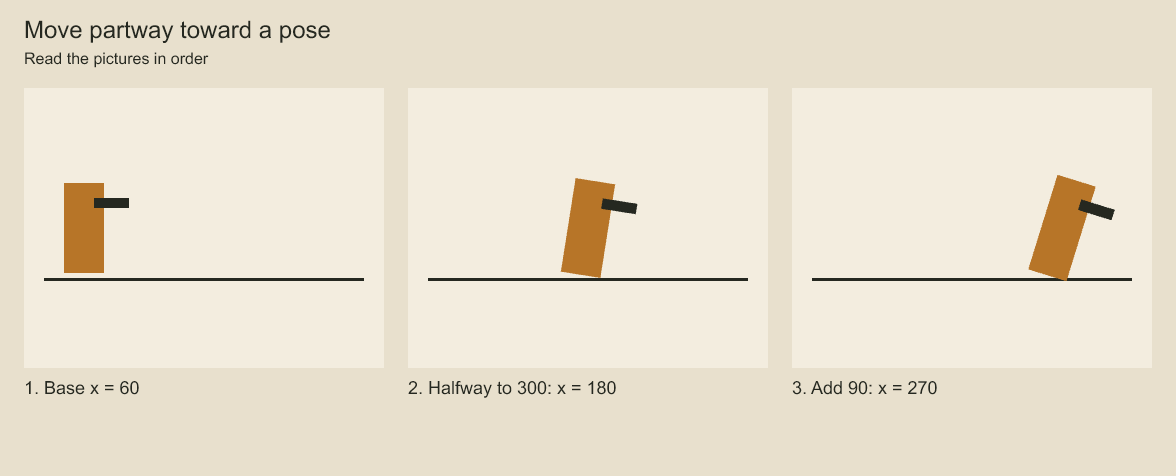
The marker starts at x = 60 and moves halfway toward x = 300, reaching x = 180. The final pose adds another 90. A replacement weight blends toward a target. An additive pose applies an extra change to the current pose.
Bake a weighted shot pose
Use layer.pose in reviseShotAnimation or project.editShotAnimation to blend selected numeric channels against the current shot draft evaluated at a signed local frame. The same edit is accepted by the durable animation.edit plan command.
project.editShotAnimation('walk-shot', [{
  op: 'layer.pose',
  layerId: 'hand',
  frame: 18,
  keyId: 'hand:pose:18',
  mode: 'replace',
  weight: 0.5,
  values: { x: 120, rotation: 0.3 },
  easing: 'ease-in-out',
}]);
replace computes (1 - weight) * evaluated + weight * supplied for each supplied channel. additive computes evaluated + weight * supplied; all supplied values are numeric deltas, including scale, opacity and depth. A scale delta of zero leaves scale unchanged; a delta of one adds one to its evaluated scale. Rotation is in radians and blends numerically without shortest-angle wrapping, preserving explicit turns.
Weights must be finite in [0, 1]; at least one finite channel value is required. A zero weight still authors keys for those channels using the evaluated values. Unspecified channels and their easing remain untouched. Explicit easing applies to supplied channels; otherwise the existing key/channel easing is retained, with linear easing for a new key. Final keys must have finite transforms, opacity in [0, 1] and positive depth; invalid results reject rather than clamp. Rig constraints and top-level depth rules still apply through final shot validation.
Use the existing key ID when this frame already has a key. An ID belonging to another frame rejects, and final validation rejects duplicate IDs or unresolved frame collisions. Each edit samples the current batch draft, so additive edits accumulate in order. Use persisted request IDs when retrying a durable plan; re-authoring an additive edit is another addition.
The stored result is an ordinary sparse keyframe and uses existing save, undo, render and export paths. No closure or new project field is persisted. This supplies local channel pose baking. For named controls and transferred animation, use the controller guide.
Pose preparation errors use INVALID_ARGUMENT with details.reason: POSE_KEY_ID_MISMATCH includes the existing key ID, POSE_KEY_ID_FRAME includes its existing frame, and POSE_RESULT_INVALID includes schema issue paths, mode and weight. Each includes target layer/key/frame. Shot edit errors add editIndex/editOperation; plan execution also adds command context. Whole-batch final validation remains separate and is not attributed to a particular pose edit.
Codeboard by Nonom Friedman
Explore Nonom Library