Animation
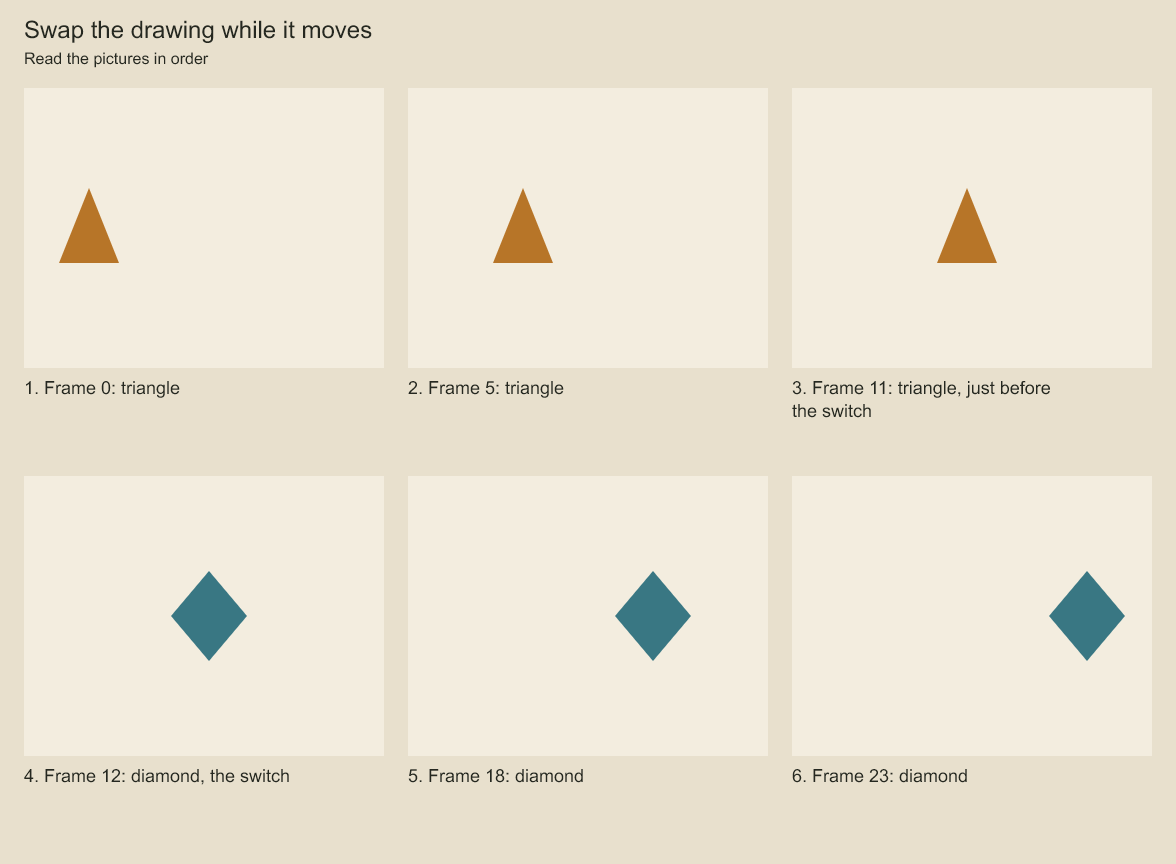
Placement interpolates continuously while drawing substitution changes the silhouette at frame 12. There is no generated in-between drawing.
Codeboard supports drawing substitutions, layer keyframes, and timed panel sequences. The board operations on this page use global, zero-based integer frames. For independent shot timelines, use reusable shots. At 24 fps, 48 frames last two seconds.
For a complete script built from the public API, follow create and revise a drawing sequence.
Compare the pace between keys. Can the same endpoints produce different movement?
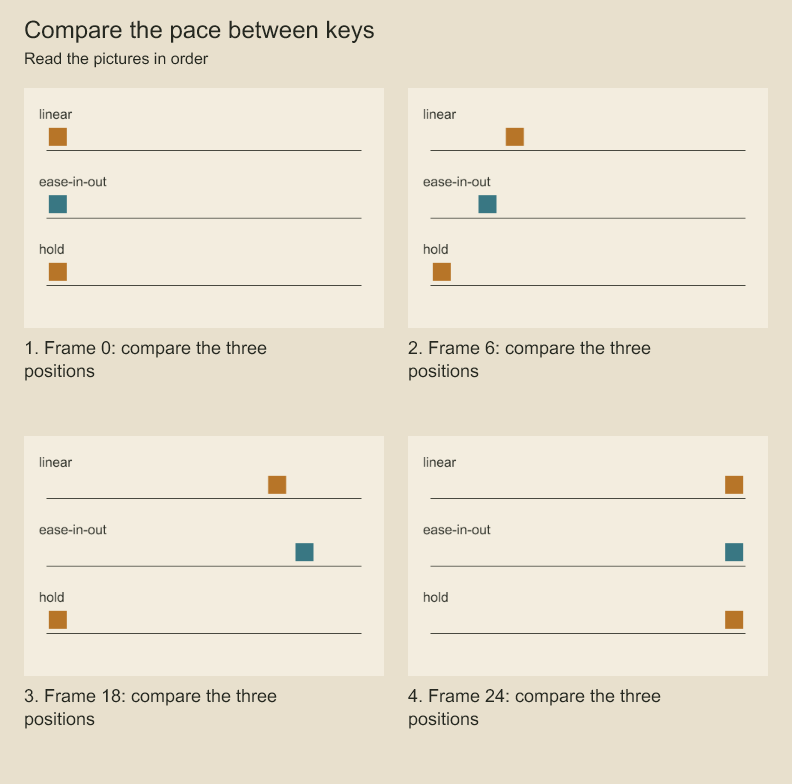
Compare the three markers at the same numbered frame. The hold marker waits until its final key. Easing changes progress between keys without changing their endpoints.
Draw a stroke over time. How does a finished gesture appear gradually?
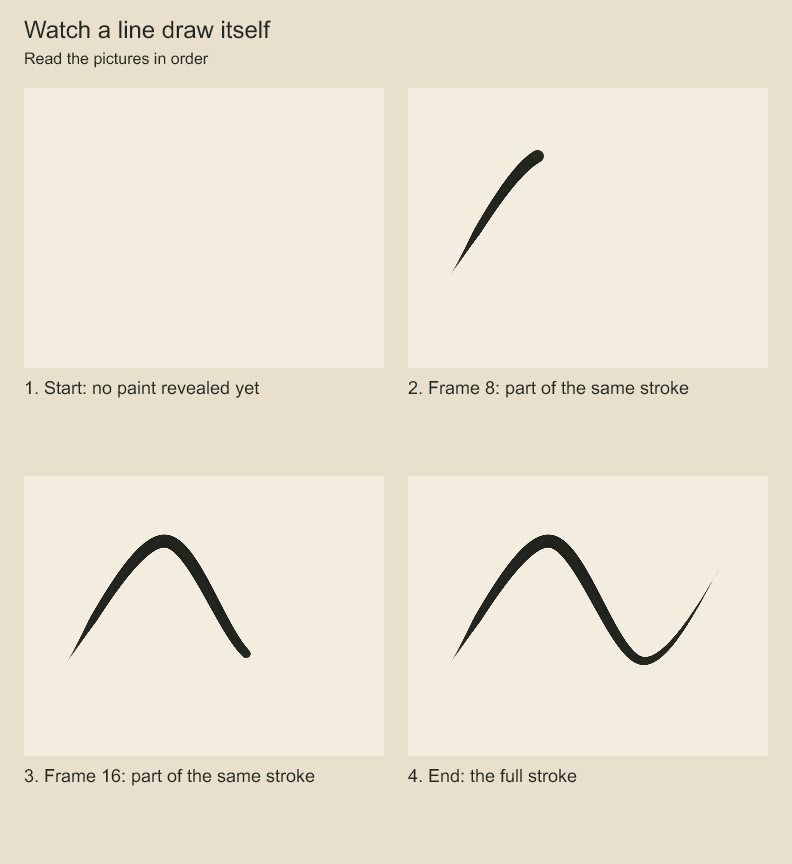
Follow the growing stroke from its first frame to the completed path. Stroke reveal controls how much of the authored path is visible over time.
Arrange panels
const shot = project.addScene('Street').addShot('Discovery');
const first = shot.addPanel({ id: 'notice', title: 'Notice the light', durationFrames: 48 });
const second = shot.addPanel({ id: 'reach', title: 'Reach toward it', durationFrames: 72 });
Panels follow each other in shot order. Here the first panel occupies frames 0–47 and the second 48–119. Add action, dialogue, camera notes, and general notes with panel options or panel.revise(...).
Frame-by-frame drawings
Create a group for a drawing track, with one child group or layer for each pose:
const track = first.addGroup('Hand drawings');
const relaxed = first.addGroup('Relaxed', {}, track.id);
const reaching = first.addGroup('Reaching', {}, track.id);
// Draw each pose in layers inside its group.
project.production.setDrawingSequence(track.id, [
  { frame: 0, drawingId: relaxed.id },
  { frame: 12, drawingId: reaching.id },
  { frame: 36, drawingId: relaxed.id },
]);
A drawing holds until the next key. drawingId: null creates a blank. Before the first exposure, the track is blank. A child drawing may combine vector lines and raster paint. Separate tracks can animate hands, eyes, or wings independently.
To replace a frame range while preserving the surrounding exposures:
project.production.setDrawingRange(track.id, 18, 24, relaxed.id);
console.log(project.production.drawingSequence(track.id));
console.log(project.production.drawingNeighbors(track.id, 20));
The end frame is exclusive. Drawing substitutions switch artwork; they do not morph one drawing into another. Use onion skins to compare poses.
Animate a layer
const startKey = project.production.addLayerKeyframe(track.id, 0, {
  transform: { x: 0 }, easing: 'ease-in-out',
});
project.production.addLayerKeyframe(track.id, 36, { transform: { x: 100 } });
project.production.addLayerKeyframe(track.id, 0, { opacity: 1 });
project.production.addLayerKeyframe(track.id, 36, { opacity: .5 });
Position, scale, rotation, opacity, and depth have independent channels. An opacity key leaves position unchanged. Unkeyed channels use the layer's base values. Before or after a channel's keys, its nearest keyed value holds.
Easing belongs to the key at the start of a segment. Choose linear, ease-in-out, hold, or a cubic Bézier object such as { type: 'cubic-bezier', x1: .2, y1: 0, x2: .8, y2: 1 }.
Read, move, or remove keys
console.log(project.production.layerKeyframes(track.id, { limit: 20 }));
project.production.updateLayerKeyframe(track.id, startKey, { frame: 2 });
project.production.removeLayerKeyframe(track.id, startKey);
Adding a key on an occupied frame merges the supplied properties into that key. Keep key IDs for targeted updates.
Change the pace
project.production.setPanelDuration(first.id, 60, 'ripple');Ripple retiming changes the panel duration, remaps its interior animation times, and shifts following panels and associated timing. Audio clips starting at or after the panel's old end move by the duration difference. Clips starting inside or before the panel keep their placement and source duration; audio is not time-stretched. Review internal cues and crossing ambience after retiming. Codeboard does not silently shorten a later shot to retain the old total duration.
Retiming uses integer frame positions. If shrinking would collapse distinct keys or drawing exposures onto the same frame, it rejects the edit; remove or move the conflicting keys first. Locked affected audio can also block retiming. preserve mode rejects a duration change that would create a gap or overlap; it does not compensate another panel.
Key collisions in panel retiming and project preserve-seconds frame-rate conversion throw CodeboardError with code INVALID_ARGUMENT. The first detected collision has details.reason: 'FRAME_COLLISION', operation: 'panel-retime' | 'timebase-conversion', ownerId, collection: 'keyframes' | 'drawingSequence', targetFrame and the two original sourceFrames. keyframes covers layer and camera keys; the owner identifies the layer or board shot. Inspect that owner and explicitly move/remove a conflicting key before retrying. This is a first-conflict diagnostic, not an exhaustive report; collapsed intervals and other timing failures keep their existing error forms.
Layer visibility and independent tracks
project.production.setExposure(track.id, { startFrame: 12, endFrame: 48 });Exposure limits a layer and its descendants to an interval with an exclusive end. Pass null to remove that visibility window. A layer exposure does not select a drawing. Use separate drawing-sequence groups for independently timed eyes, hands, mouths, or wings.
duplicateDrawing(groupId, drawingId, name) makes a separate editable pose in the same track. setDrawingSequence(groupId, null) removes substitution behavior; ordinary child layers then render according to their own visibility. It does not delete drawings.
Inspect and remove a channel
import { evaluateLayer, evaluateDrawing } from 'codeboard-studio';
const layer = project.production.layer(track.id);
console.log(evaluateLayer(layer, 24));
const sequence = project.production.drawingSequence(track.id);
console.log(evaluateDrawing(sequence.keys ?? [], 24));
project.production.removeLayerKeyframeChannels(track.id, startKey, ['opacity']);
Use channel removal on a key that contains that channel. Removing a whole key discards every channel on it; removing one channel preserves the others. Drawing substitutions are separate from transform keys.
Transitions and stroke reveal
project.production.setTransition(first.id, { type: 'dissolve', durationFrames: 8 });Available transitions are cut, dissolve, wipe-left, and wipe-right. For a drawn-on stroke, supply reveal: { startFrame: 0, endFrame: 24 } when creating a raster stroke. Pen sample timestamps alone do not animate a stroke.
Transition duration must fit inside its panel. Use renderFramePNG or a movie to review a transition: a single-panel render evaluates that panel's artwork, not the timeline blend. Stroke reveal is blank at its start frame and complete at its end frame. Shot animation supports a typed compositing graph; automatic in-between drawing generation is not currently provided. See mesh deformation for deforming shot artwork.
Codeboard by Nonom Friedman
Explore Nonom Library