Code-first rig and controller workflow
Build a character whose joints, bends and poses remain editable. Start with the simplest control that fits the motion, then add deformation only where the artwork needs it.
| What needs to move | Guide |
|---|---|
| An articulated arm or leg | Two-bone joints |
| A tail or flexible strip | Curve ribbons |
| A patch bounded on four sides | Envelopes |
| A custom triangle surface | Meshes |
| Artwork influenced by several joints | Skin weights |
| Several parts driven by one named pose | Controllers |
| An existing performance on another rig | Performance transfer |
Create the shot and layers first using reusable shots and shot layers. Keep layer IDs stable so later corrections can address the same parts.
Can the hand reach the target?. What happens when a target is too far away?
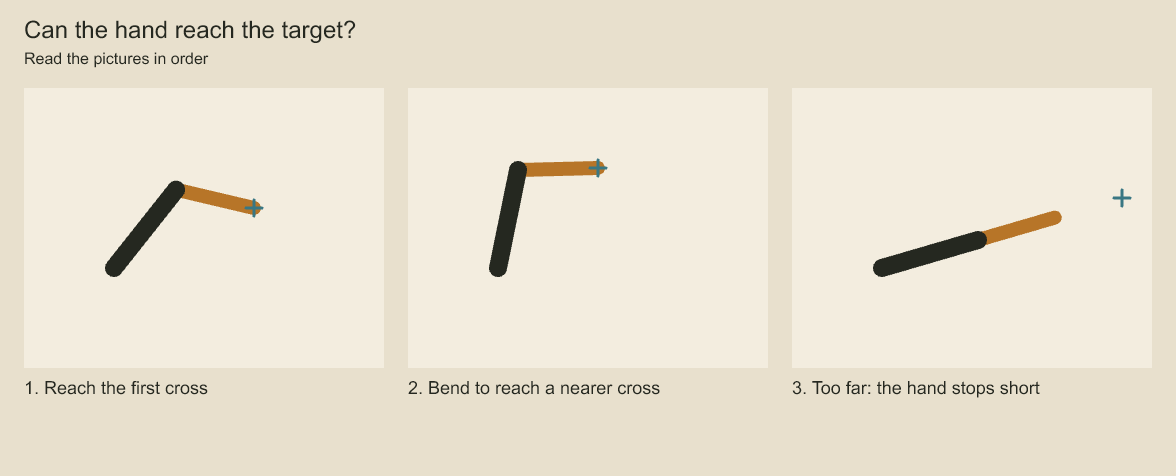
The cross marks the requested hand position. Compare the gap between the hand and cross in the last picture. The arm can turn at its joints, but its two segment lengths limit its reach.
Inspect before choosing the correction
Discover shot/layer/controller IDs with bounded object queries. Use shotMeshData to page bind
geometry, frame vertices, joints and weights. Use shotControllerData to page controller keys
or targets; with a frame, target states include the full controller stack. CLI equivalents are
mesh-data and controller-data, both supporting an expected saved version. Restart inspection
after edits. Pages are detached copies, not mutation handles.
For a one-time key correction use layer.pose. For non-destructive numeric influence over base
keys, use a named controller. Drawing substitutions still own distinct authored silhouettes;
controller pose blending does not generate new drawings.
Bind and author deformation
A layer has one mesh, curve, envelope or skin binding. Choose it from the artwork's required
motion. For skin, supply explicit topology, weights, joints and joint-layer mappings. Use
layer.skin.bind.capture at the intended rest frame to capture joint transforms relative to the
mesh. Capture leaves source geometry and joint keys unchanged but changes how future poses deform.
Edit joint keys or drive them with controllers. Correct individual weights with
layer.skin.weights.put. Every vertex needs a complete normalized influence list; no automatic
weight generation is implied. Shared deformed ancestors are supported by the coordinate model;
independent deformation crossings reject. Inspect the reported boundary before restructuring.
Skin rest restoration requires explicit joint keys. layer.deformation.rest.apply instead
inserts a rest key for vertex meshes, curves or envelopes. Use non-affine point queries for
skinned artwork and retain multiple inverse candidates at overlapping/shared faces.
Build and revise controls
controller.put stores named multi-layer poses with replace/additive blending and animated
weights. Choose channels and coordinate spaces explicitly. captureShotController can capture
base or fully controlled local poses; additive capture requires a reference frame. Captures
start at weight zero to avoid changing the pose merely by storing them.
Use weight/key edits for activation and controller.move for explicit blend order. Static
weight is only the fallback for an empty key track. controller.range gates influence within
[start,end); it does not create fades. Inspect the result after all controllers, including
intermediate frames where mesh geometry can collapse despite valid endpoints.
Reuse and persist
Create a controller performance package from selected controllers and save its JSON with the authoring project. Read/import validates schema and logical-payload SHA-256. Keep source package order when selecting interacting controllers. Compilation requires new controller IDs, complete one-to-one layer mappings, equal frame rates and an explicit offset. Optional source ranges gate activity while retaining keys needed for original interpolation.
This package transfers numeric poses and weight tracks; destination rig geometry, base keys, artwork and dependencies remain independently owned. Compatibility of local spaces, pivots and proportions must be established by the caller. A checksum does not authenticate the producer or make a file immutable.
For a complete rig already authored in the same project, use
project.duplicateShotAnimation(sourceAnimationId, { id, shotId, name? }).
The destination shot must already exist and the animation ID must be new. This duplicates the
whole local animation: layer hierarchy/artwork, signed keys, exposure/drawing choices, camera,
deformation recipes, skin bind/weights/joint-layer links, controllers and local audio tracks.
Duration, canvas and frame rate remain those of the source; it does not retime to board timing.
Every owned layer, element, key, controller, audio track/clip and animation receives a distinct
project ID. Internal references are remapped; binding-local skin joint IDs stay local to each
copied binding. The direct result includes animationId, sourceAnimationId and complete
identities: [{ sourceId, copyId }], useful for subsequent edits. This caller-owned allocation
report is not a bounded inspection page; avoid sending the full map as an agent tool response
for a large shot. Use bounded object queries for discovery after a saved-plan duplication.
For durable retries use animation.duplicate with sourceAnimationId, new id, destination
shotId and optional name. Commit the plan at the observed project version. The operation uses
the existing document transaction, validation, undo and receipt path. Copied tracked components
retain remapped origins, including reserved IDs for locally deleted source objects. Historical
review comments, locks, approvals, board-panel links and editorial clips are not copied. Add
board links or editorial placement explicitly after choosing the destination shot.
Project media assets, palettes, brushes embedded in artwork, component library IDs and font requirements retain their source semantics: artwork buffers/embedded brushes are detached, while named project resources remain shared. Duplication does not create a portable dependency package or publish an immutable asset. Use project publish for a pinned native-project handoff.
Before handing off a shot, inspect project.shotDependencyData(animationId, { offset, limit }).
Pages include project version, a deterministic dependencyHash, total and next offset. Default
page size is 50, capped at 200, with a 256 KiB response limit. Collect pages at one project version
and dependency hash.
The resource walk covers current shot artwork, referenced library components recursively, retained origins for live shot layers, source-baseline artwork, swatches/palettes, text font declarations and local audio assets, including muted tracks. Archived origins unrelated to the shot are excluded. Historical source IDs are not interpreted as live instance IDs.
Records distinguish embedded project records, declared external requirements and missing
records. Component versions and origin checksums are included. Swatches identify their owning
palette; local color overrides still retain the swatch dependency. A baseline may reference a
swatch removed from current artwork, so missing historical dependencies are reported too.
For assets, sha256 hashes the asset metadata; checksum separately reports the declared media
checksum or null. Neither proves the file exists or matches its declaration. Font IDs contain
the requested CSS font string and have no file hash. Use media/font preflight in the destination
environment before render. Embedded raster and brush content already belongs to artwork and
does not appear as an external media reference. The dependency hash identifies this resource
report, not the shot's poses, rendered pixels or a portable package. Page bounds limit returned
metadata; collection still traverses and hashes the relevant source artwork.
Export an isolated native shot project
exportShotProject(sourcePath, animationId, destination, options) writes a new .cboard containing
one shot and its resource closure. Options require expectedVersion and a projectId different
from the source; optional title, maxBytes (up to 1 GiB) and signal control publication.
The destination must be new. Reopen it with StoryboardProject.open and use the normal shot
authoring APIs. This is an editable native project, so no second rig file format is required.
The subset retains animation/artwork IDs, shot-local timing, rig geometry, controllers, local audio, current component sources, tracked origins and required palettes. Required media bytes come from the source container with version checks, using the existing storage checksum path. Font requirements are reported as external CSS font declarations and must be installed or resolved explicitly in the destination environment. No filesystem search substitutes missing media.
Only the selected scene/sequence/shot ownership records remain. Board links/panels, editorial placements, script, comments, locks, approvals, prior changes, checkpoints and receipts are omitted. The package stores source project ID, version, animation ID and source document hash in metadata. The new project has its own revision history; source timestamps and artwork identities remain. Use the explicit source base for later worker merge. Importing several unrelated packages into one project still requires resource/ID reconciliation and is not implemented by this exporter.
Publication writes and verifies a temporary native container, then uses the existing verified, exclusive snapshot-copy path. Existing destinations reject without replacement. Cleanup failures are reported; as with project copy, a cleanup failure after publication can leave a valid final file, so inspect it before retrying. The byte budget bounds the published container, not peak memory or temporary encoding work. Cancellation is checked between synchronous storage phases and during snapshot copy; it cannot interrupt a synchronous document encode halfway through.
The result includes output document identity, pinned source identity, resource dependency hash and external font requirements. External font installation remains the recipient's responsibility.
Merge a revised native handoff
Keep the original source project snapshot used for export. After worker edits, call
planShotHandoffMerge(assembly, baseline, worker, { animationId, resolutions? }) with opened
projects. The adapter checks the worker's stored source ID/version/document hash against the
supplied baseline and requires the assembly to share that source project ID. These provenance
fields detect the wrong baseline; they are not signatures or producer authentication.
The adapter restores the baseline board links omitted by export before the three-way merge, so packaging does not become an accidental deletion. Local assembly changes to those links remain ordinary local changes. Worker-added board links reject and require explicit assembly reconciliation. Artwork conflicts use the existing JSON Pointer resolution contract.
dependencyConflicts lists each worker resource missing or different in the candidate assembly,
with baseline/local/incoming descriptors. Any dependency conflict prevents plan creation. This
check conservatively requires compatibility with the worker's entire reported resource closure,
including retained baselines and complete palette records. It neither imports new resources nor
automatically chooses a different palette/component version. Reconcile those resources explicitly
and preview again. Media and font descriptors do not prove installed bytes or glyph availability.
A null plan can mean unresolved artwork conflicts, dependency conflicts, or no incoming artwork change. Inspect both conflict lists. A produced plan has normal project-version/hash guards and the 1 MiB plan limit; persist its exact request ID and payload for retries. The report is bounded to 256 KiB before plan construction.
For a palette dependency conflict, planPaletteMerge(assembly, basePalette, incomingPalette)
prepares an explicit resource reconciliation using the original palette baseline. Inspect its
conflicts and affected bindings before committing. Apply the chosen resulting palette to the
worker through its own palette.put plan as well, preserving the original full source baseline
for provenance checks. Then re-run planShotHandoffMerge. This deliberately separates shared
resource agreement from the artwork merge; the handoff adapter still rejects remaining resource
differences. Palette propagation can affect other shots using the same swatches and respects
their locks. Keep each plan/request pair for retries and do not replace the retained baseline
with one of these newer project states.
Put compiled edits into an ordinary animation.edit plan. Persist the exact plan/request ID,
commit against the observed version and retry that same pair after an uncertain acknowledgement.
Follow saved edit plans for conflicts and receipts. Never replace existing
controllers merely to evade an import ID conflict.
Review interval boundaries and representative frames, reopen saved state when qualifying persistence, and compare base keys to confirm preservation. Report which checks actually ran.
Codeboard by Nonom Friedman
Explore Nonom Library