Reuse a controller performance
Transfer a performance to an existing compatible rig by mapping its layer and controller IDs. Check the destination proportions and pivots before applying the result.
Read a gesture across four shots. Can you follow who offers and who receives the card?
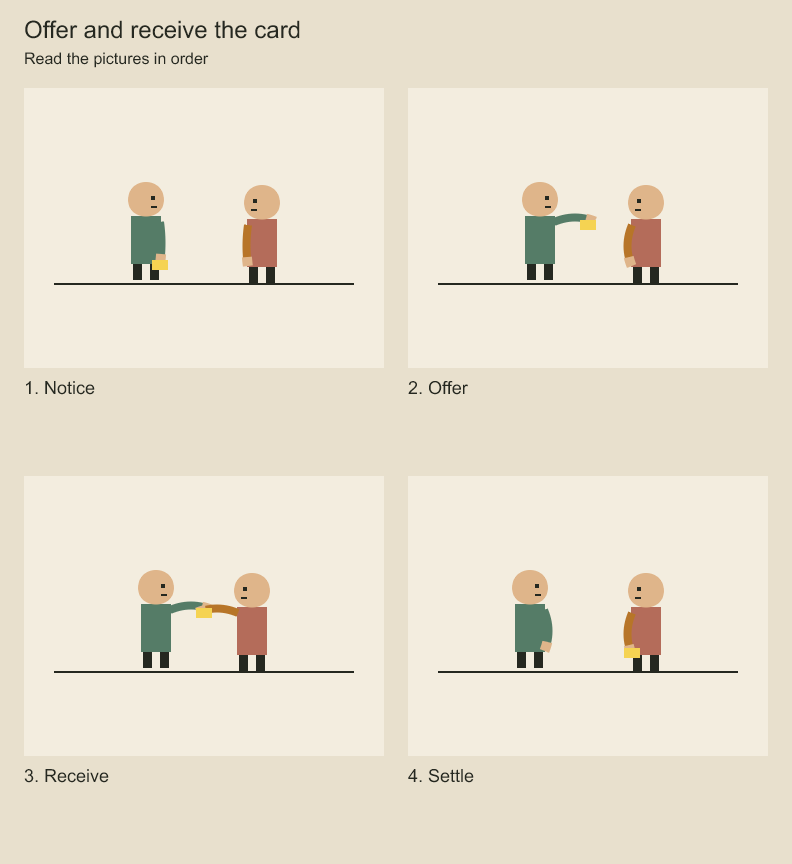
Watch the yellow card and the two hands: notice, offer, receive, then hold. Use the stills to compare each pose. The sequence combines arm bends, position controls and held mouth drawings. The card path and mouth cues are authored explicitly.
Transfer controller animation with explicit targets
compileControllerTransfer(sourceShot, targetShot, options) returns ordinary ShotAnimationEdit[]
without changing either input. Select controllers with controllers: [{ sourceId, targetId }],
map their referenced layers with layers: [{ sourceId, targetId }], and supply a signed safe
integer frameOffset. Feed the returned edits into animation.edit in a version-pinned plan.
The normal project transaction remains responsible for locks and cross-project identity checks.
Mappings must be complete and one-to-one; unused layer mappings reject. Destination controller IDs must be new, and all destination layers must exist. Final shot validation catches IDs colliding with other shot objects and controller limits. Existing destination controllers and base keys remain unchanged; transferred controllers append in the supplied controller mapping order. Their effects can change the final appearance through normal blending. No automatic replacement or override merge occurs.
This transfers the complete selected controller definitions and weight tracks. Equal normalized frame rates are required; offsets use exact integer addition and reject unsafe results. Signed pre/post-roll keys are retained rather than trimmed to the destination duration. Local pose values are copied unchanged: compatible hierarchy, pivots, proportions and scale remain the caller's responsibility. No geometric retarget solver, destructive key-track slicing, drawing transfer, asset dependency packaging or immutable publication is implied.
Limit controller activity to a performance range
Controllers optionally store activeRange: { startFrame, endFrame }, using signed local frames
and an exclusive end. Outside that nonempty interval, evaluated weight is zero regardless of
the static weight or keys. Inside, existing interpolation and nearest-key extension apply.
There is no implicit fade at the boundaries; author weight keys when a fade is intended.
project.editShotAnimation(animationId, [{
  op: 'controller.range', id: 'controller:bend',
  range: { startFrame: 12, endFrame: 36 },
}]);
Use range: null to remove the gate. This retains all keys, targets and base animation.
Inspection pages expose the saved range and include its gate in evaluatedWeight and target
states. Existing controllers without a range retain their previous unbounded behavior.
compileControllerTransfer accepts optional sourceRange with the same boundaries. It
intersects that selection with each source controller's active range, rejects empty overlaps,
and shifts the resulting interval by frameOffset. Without a selection, any existing source
range is still shifted. Both shifted endpoints must remain safe integers.
The full source key track is retained and shifted, including keys outside the selected range. Those keys provide interpolation context; removing them or synthesizing endpoint keys would change cubic/eased curves near a trim. Only the active gate limits the transferred performance's contribution. This is not a filtered-data export: out-of-range source keys remain inspectable. Base keys and earlier controller contributions remain visible outside the interval.
Capture a pose as a controller
captureShotController(animation, options) returns a new detached controller definition without
mutating the shot. Explicitly choose the layers/channels and whether evaluation uses base
layer keys or the fully controlled local pose. Replace capture stores absolute channel values;
additive capture requires a referenceFrame and stores pose-minus-reference offsets.
const controller = captureShotController(animation, {
  id: 'controller:lean', name: 'Lean correction',
  mode: 'additive', frame: 12, referenceFrame: 0, evaluation: 'controlled',
  targets: [{ layerId: torsoId, channels: ['x', 'rotation'] }],
});
project.editShotAnimation(animation.id, [{ op: 'controller.put', controller }]);
The result has static weight zero and no keys/range. Saving it is initially inert; author a weight or weight track to apply it. For additive capture, enabling it on top of the original controlled pose adds the captured delta again. Choose the destination base pose deliberately. Captured values use local parent coordinates and arithmetic scale offsets, not world-space constraints, deformation vertices or multiplicative scale ratios.
Targets/channels must be distinct and existing; a new controller ID is required. Capture checks finite offsets, shot identity/reference limits and insertion capacity through ordinary shot validation. It retains neither a live reference to the source frame nor a dependency on the source controller: subsequent source edits do not update the captured pose.
Codeboard by Nonom Friedman
Explore Nonom Library