Develop a script and stage panels
Keep action and dialogue in stable script records, then explicitly choose which records become panels. Drawing and timing remain your authoring decisions.
A script and a panel caption are separate. Does editing a caption rewrite the script?
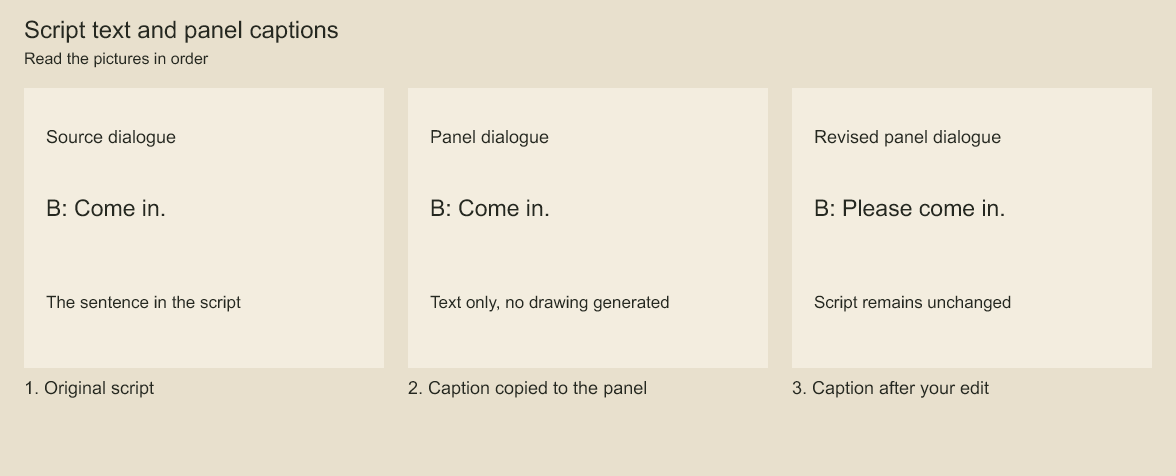
Read the dialogue in the source card, the staged caption and the revised caption. The source text stays unchanged. Staging links script records to panels. A later caption edit changes the panel's text, not its original script record.
Keep an independent production script
Script records hold scene headings, action and dialogue separately from board captions. IDs are supplied by the author/importer and stay stable across revisions. Link records to existing panel IDs; one record can span several panels and one panel can illustrate several records. Updating script text does not change captions, artwork, editorial timing or animation.
import type { ScriptInput } from 'codeboard-studio';

const script: ScriptInput = {
  id: 'script:main', title: 'The doorway',
  entries: [
    {id: 'script:scene-01', kind: 'scene', text: 'INT. ROOM', panelIds: [notice.id]},
    {id: 'script:line-01', kind: 'dialogue', speaker: 'Mira', text: 'Come in.', panelIds: [notice.id]},
  ],
};
const changes = project.replaceScript(script, 0); // zero means no previous script
console.log(changes.revision, changes.added, changes.updated);
console.log(project.scriptSummary());
console.log(project.scriptEntries({offset: 0, limit: 50}));
replaceScript replaces the complete entry list explicitly. Its required expected revision prevents stale script revisions; unchanged input creates neither a new script revision nor a project edit. Reports list added/removed IDs, changed fields, title changes and entry-order changes. Omitting an existing entry removes it. To unlink a panel, remove its ID from the relevant entries before deleting that panel, optionally in the same transaction. Missing panel links, duplicate IDs, an ID shared with artwork, and a speaker on a non-dialogue record reject atomically.
For durable agent edits, use the existing saved-project plan workflow with {op: 'script.replace', script, expectedRevision: 1} and persist/retry the same plan/request ID. Script state participates in save/open, undo/redo, named checkpoints, query discovery (script and script-entry kinds), and global ID validation. Reads are detached and paged. A script is limited to 1,000 entries and 1 MiB; entry text is limited to 65,536 characters. The current project supports one script. This is a typed script model, not a Final Draft parser or automatic story generator.
The optional data lives under the strict schema-5 studio payload. Documents without a script remain valid. Older project formats require the documented migration before writing; older runtimes that do not recognize studio.script reject it. Use a matching engine rather than expecting older releases to preserve the field.
Stage new panels from script records
planScriptBoard creates panels from explicitly selected script records and appends the new panel IDs to those records in one atomic plan. Supply an existing shot ID, new panel ID, selected entry IDs and duration for every panel. The engine does not infer shot boundaries or timing from text.
import { planScriptBoard } from 'codeboard-studio';

const staging = planScriptBoard(project, [{
  panelId: 'board:doorway-reply', shotId: shot.id,
  entryIds: ['script:scene-01', 'script:line-01'], durationFrames: 48,
}]);
// Persist staging.plan before committing to a saved project.
await project.commit(staging.plan, {requestId: 'stage-doorway-v1'});
Scene text supplies the title unless title is specified; action records supply action captions; dialogue records supply speaker-prefixed dialogue. Multiple records join in the requested order. Panels append to their selected shots using the existing timeline reflow rules, so inserting into an earlier shot can shift later board material. Existing script links are retained. Existing panel IDs, duplicate requests, unknown entries/shots and invalid durations reject rather than guessing or overwriting. New panels have empty layers; draw their artwork separately. Subsequent script revisions do not silently regenerate these panels. After a timeout, retry the same persisted plan/request ID instead of planning another staging operation.
Codeboard by Nonom Friedman
Explore Nonom Library